> ## Documentation Index
> Fetch the complete documentation index at: https://docs.parea.ai/llms.txt
> Use this file to discover all available pages before exploring further.
# Tactics for multi-step AI app experimentation
> Practices to improve LLM apps component-wise
[//]: # "title: \"Improving multi-step AI apps Offline experimentation workflow\""
[//]: # "description How to test & optimize LLM apps with multiple parts as part of an offline experimentation workflow"
[Joschka Braun](https://joschkabraun.com) on Jul 22, 2024
We help companies build & improve their AI products with our hands-own
services. Request a consultation
[here](https://calendly.com/parea-ai/consulting).
In this article, we will discuss tactics specific to testing & improving multi-step AI apps.
We will introduce every tactic, demonstrate the ideas on a sample RAG app, and finally see how [Parea](https://www.parea.ai) simplifies the application of this idea.
The aim of this blog is to give guidance on how to improve multi-component AI apps no matter if you use Parea or not.
## Sample app: finance chatbot
A simple chatbot over the AirBnB 10k 2023 dataset will lend itself as our sample application.
We will assume that the user only writes keywords to ask questions about AirBnB's 2023 10k filing.
Given the user's keywords, we will expand the query.
Then use the expanded query to retrieve relevant contexts which are used to generate the answer.
Checkout the pseudocode below illustrating the structure:
```python Python theme={null}
def query_expansion(keyword_query: str) -> str:
# LLM call to expand query
pass
def context_retrieval(query: str) -> list[str]:
# fetch top 10 indexed contexts
pass
def answer_generation(query: str, contexts: list[str]) -> str:
# LLM call to generate answer given queries & contexts
pass
def chatbot(keyword_query: str) -> str:
expanded_query = query_expansion(keyword_query)
contexts = context_retrieval(expanded_query)
return answer_generation(expanded_query, contexts)
```
```typescript TypeScript theme={null}
const queryExpansion = (keywordQuery: string): string => {
// LLM call to expand query
throw new Error("Not implemented");
};
const contextRetrieval = (query: string): string[] => {
// fetch top 10 indexed contexts
throw new Error("Not implemented");
};
const answerGeneration = (query: string, contexts: string[]): string => {
// LLM call to generate answer given queries & contexts
throw new Error("Not implemented");
};
const chatbot = (keywordQuery: string): string => {
const expandedQuery = queryExpansion(keywordQuery);
const contexts = contextRetrieval(expandedQuery);
return answerGeneration(expandedQuery, contexts);
};
```
## Tactic 1: QA of every sub-step
Assuming a 90% accuracy of any step in our AI application, implies a 60% error for a 10-step application (**cascading effects of failed sub-steps**).
Hence, quality assessment (QA) of every possible sub-step is crucial.
It goes without saying that testing every sub-step simplifies identifying where to improve our application.
How to exactly evaluate a given sub-step is domain specific.
Yet, you might want to check out these lists of [reference-free](/blog/eval-metrics-for-llm-apps-in-prod) and [referenced-based](/blog/llm-eval-metrics-for-labeled-data) eval metrics for inspiration.
Reference-free means that you don't know the correct answer, while reference-based means that you have some ground truth data to check the output against.
Typically, it becomes a lot easier to evaluate when you have some ground truth data to verify the output.
### Applied to sample app
Evaluating every sub-step of our sample app means that we need to evaluate the query expansion, context retrieval, and answer generation step.
In tactic 2, we will look at the actual evaluation functions of these components.
### With Parea
Parea helps in two ways with this step.
It simplifies instrumenting & testing a step as well as creating reports on how the components perform.
We will use the [`trace` decorator](/observability/logging_and_tracing#usage-2) for instrumentation and evaluation of any step.
This decorator logs any inputs, output, latency, etc., creates traces (hierarchical logs), executes any specified evaluation functions to score the output and saves their scores.
To report the quality of an app, we will [run experiments](/welcome/getting-started-evaluation).
Experiments measure the performance of our app on a dataset and enable identifying regressions across experiments.
Below you can see how to use Parea to instrument & evaluate every component.
```python Python theme={null}
# pip install -U parea-ai
from parea import Parea, trace
# instantiate Parea client
p = Parea(api_key="PAREA_API_KEY")
# observing & testing query expansion; query_expansion_accuracy defined in tactic 2
@trace(eval_funcs=[query_expansion_accuracy])
def query_expansion(keyword_query: str) -> str:
...
# observing & testing context fetching; correct_context defined in tactic 2
@trace(eval_funcs=[correct_context])
def context_retrieval(query: str) -> list[str]:
...
# observing & answer generation; answer_accuracy defined in tactic 2
@trace(eval_funcs=[answer_accuracy])
def answer_generation(query: str, contexts: list[str]) -> str:
...
# decorate with trace to group all traces for sub-steps under a root trace
@trace
def chatbot(keyword_query: str) -> str:
...
# test data are a list of dictionaries
test_data = ...
# evaluate chatbot on dataset
p.experiment(
name='AirBnB 10k',
data=test_data,
func=chatbot,
).run()
```
```typescript TypeScript theme={null}
import { Parea, trace } from 'parea-ai';
// instantiate Parea client
const p = new Parea({ apiKey: "PAREA_API_KEY" });
// observing & testing query expansion; queryExpansionAccuracy defined in tactic 2
}
const queryExpansion = trace('queryExpansion', (keywordQuery: string) => {
...
}, { evalFuncs: [queryExpansionAccuracy] });
// observing & testing context fetching; correctContext defined in tactic 2
const contextRetrieval = trace('contextRetrieval', (query: string) => {
...
}, { evalFuncs: [correctContext] });
// observing & answer generation; answerAccuracy defined in tactic 2
const answerGeneration = trace('answerGeneration', (query: string, contexts: string[]) => {
...
}, { evalFuncs: [answerAccuracy] });
// decorate with trace to group all traces for sub-steps under a root trace
const chatbot = trace('chatbot', (keywordQuery: string) => {
...
});
// test data are a list of objects
const testData = ...;
// evaluate chatbot on dataset
const experiment = p.experiment({
name: 'AirBnB 10k',
data: testData,
func: chatbot,
})
await experiment.run();
```
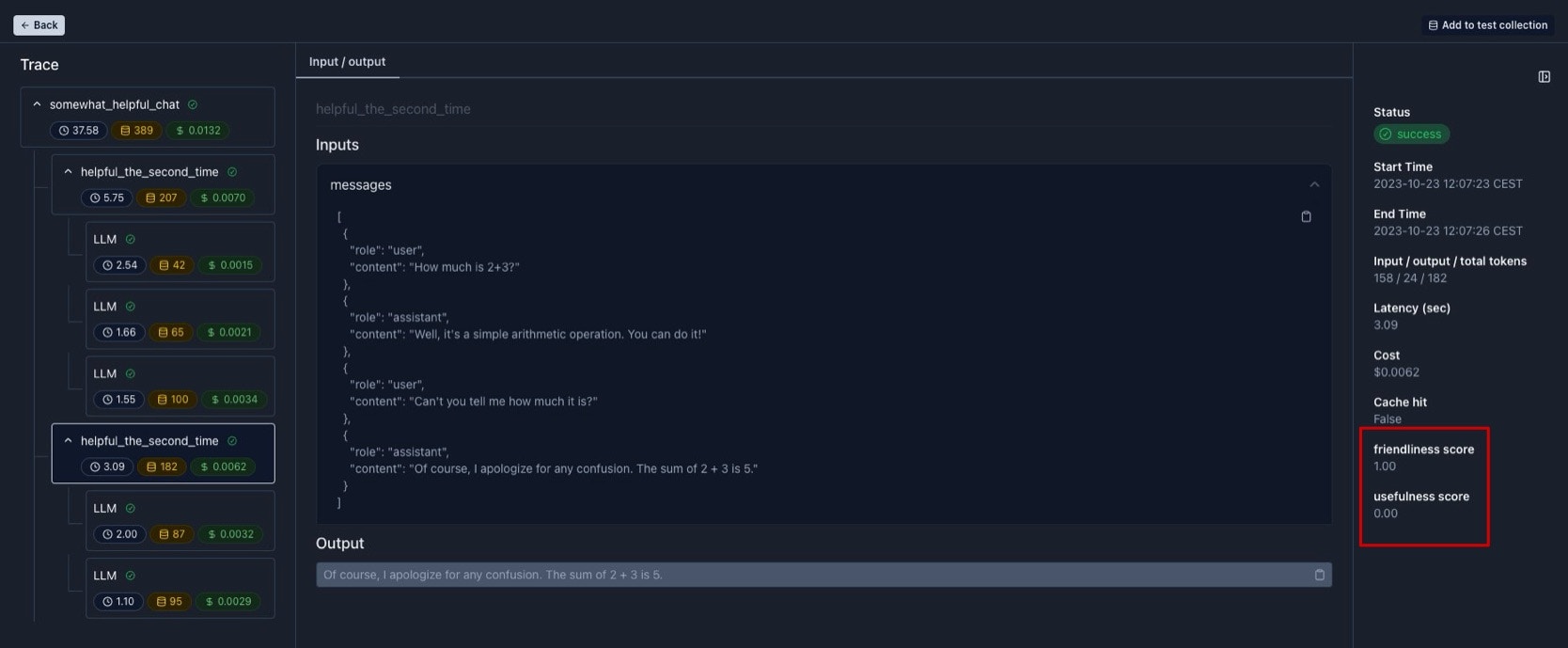
Below is a sample visualization. You can see the scores of a span and its children in the bottom right corner.
 ## Tactic 2: Reference-based evaluation
As mentioned above, reference-based evaluation is a lot easier & more grounded than reference-free evaluation.
This also applies to testing sub-steps.
Using production logs as your test data is very useful.
You should collect & store them with any (corrected) sub-step outputs as test data.
For the case that you do not have ground truth/target values, esp. for sub-steps, you should consider **synthetic data generation incl. ground truths for every step**.
Synthetic data also come in handy when you can't leverage production logs as your test data.
To create synthetic data for sub-steps, you need to incorporate the relationship between components into the data generation.
See below for how this can look like.
### Applied to sample app
We will start with generating some synthetic data for our app.
For that we will use [Virat](https://twitter.com/virattt)’s processed AirBnB 2023 10k filings dataset and generate synthetic data for the sub-step (expanding the keyword into a query).
As this dataset contains triplets of question, context and answer, we will do the inverse of the sub-step: generate a keyword query from the provided question.
To do that, we will use [Instructor](https://python.useinstructor.com) with the OpenAI API to generate the keyword query.
```python Python theme={null}
# pip install -U instructor openai
import os
import json
import instructor
from pydantic import BaseModel, Field
from openai import OpenAI
# Download the AirBnB 10k dataset
path_qca = "airbnb-2023-10k-qca.json"
if not os.path.exists(path_qca):
!wget https://virattt.github.io/datasets/abnb-2023-10k.json -O airbnb-2023-10k-qca.json
with open(path_qca, "r") as f:
question_context_answers = json.load(f)
# Define the response model to create the keyword query
class KeywordQuery(BaseModel):
keyword_query: str = Field(..., description="few keywords that represent the question")
# Patch the OpenAI client
client = instructor.from_openai(OpenAI())
test_data = []
for qca in question_context_answers:
# generate the keyword query
keyword_query: KeywordQuery = client.chat.completions.create(
model="gpt-3.5-turbo",
response_model=KeywordQuery,
messages=[{"role": "user", "content": "Create a keyword query for the following question: " + qca["question"]}],
)
test_data.append(
{
'keyword_query': keyword_query.keyword_query,
'target': json.dumps(
{
'expanded_query': qca['question'],
'context': qca['context'],
'answer': qca['answer']
}
)
}
)
# Save the test data
with open("test_data.json", "w") as f:
json.dump(test_data, f)
```
With these data, we can evaluate our sub-steps now as follows:
* query expansion: [Levenshtein distance](https://en.wikipedia.org/wiki/Levenshtein_distance) between the original question from the dataset and the generated query
* context retrieval: hit rate at 10, i.e., if the correct context was retrieved in the top 10 results
* answer generation: Levenshtein distance between the answer from the dataset and the generated answer
### With Parea
Using the synthetic data, we can formulate our evals using Parea as shown below.
Note, an eval function in Parea receives a `Log` object and returns a score.
We will use the `Log` object to access the `output` of that step and the `target` from our dataset.
The `target` is a stringified dictionary containing the correctly expanded query, context, and answer.
```python Python theme={null}
from parea.schemas import Log
from parea.evals.general.levenshtein import levenshtein_distance
# testing query expansion
def query_expansion_accuracy(log: Log) -> float:
target = json.loads(log.target)['expanded_query'] # log.target is of type string
return levenshtein_distance(log.output, target)
# testing context fetching
def correct_context(log: Log) -> bool:
correct_context = json.loads(log.target)['context']
retrieved_contexts = json.loads(log.output) # log.output is of type string
return correct_context in retrieved_contexts
# testing answer generation
def answer_accuracy(log: Log) -> float:
target = json.loads(log.target)['answer']
return levenshtein_distance(log.output, target)
# loading generated test data
with open('test_data.json') as fp:
test_data = json.load(fp)
```
```typescript TypeScript theme={null}
import { Log, levenshteinDistance } from 'parea-ai';
// testing query expansion
function queryExpansionAccuracy(log: Log): number {
const target = JSON.parse(log.target).expanded_query;
return levenshteinDistance(log.output, target);
}
// testing context fetching
function correctContext(log: Log): boolean {
const correctContext = JSON.parse(log.target).context;
const retrievedContexts = JSON.parse(log.output);
return retrievedContexts.includes(correctContext);
}
// testing answer generation
function answerAccuracy(log: Log): number {
const target = JSON.parse(log.target).answer;
return levenshteinDistance(log.output, target);
}
```
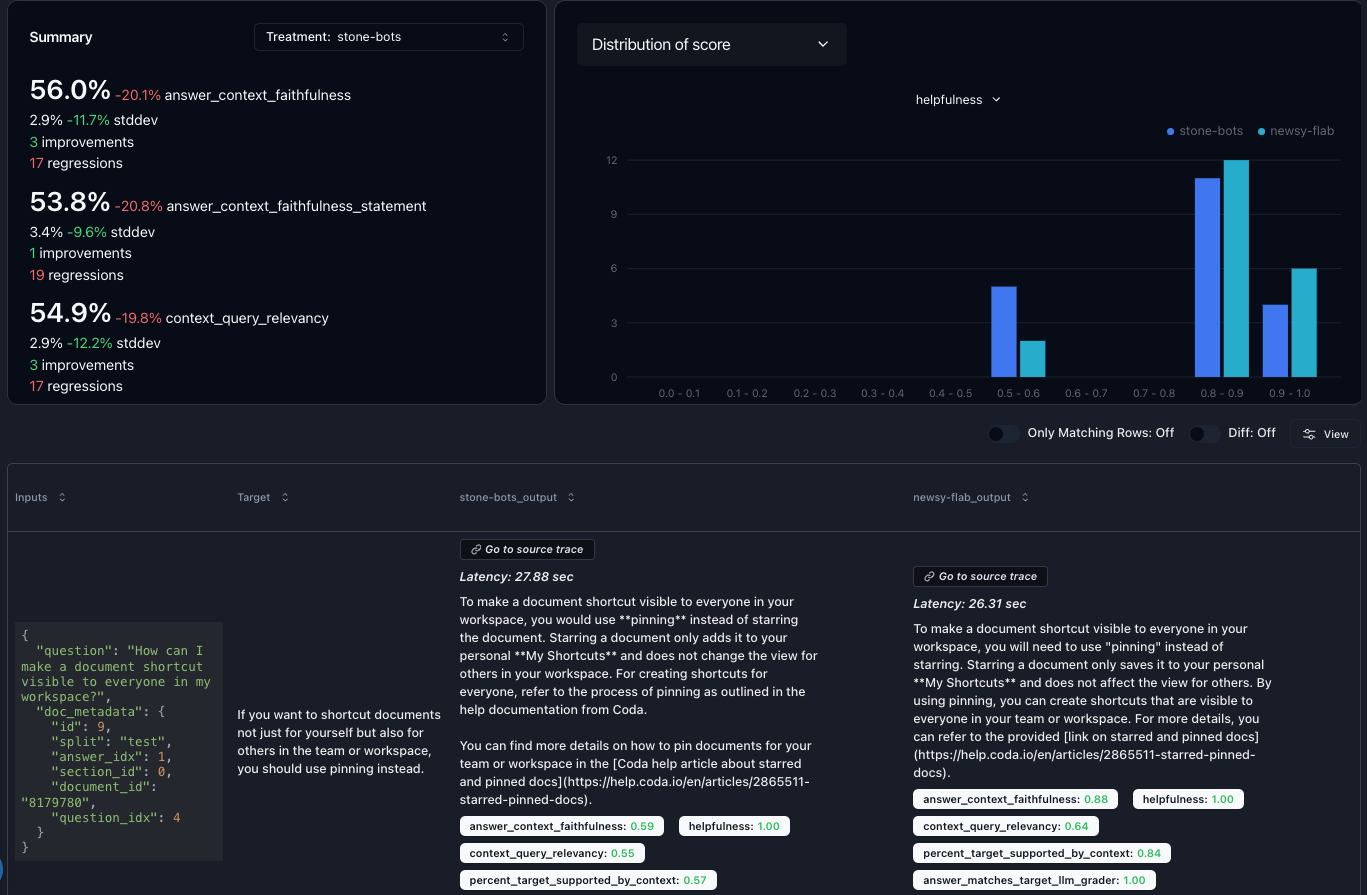
After logging experiments, you can compare their outputs side-by-side and identify regressions across runs:
## Tactic 2: Reference-based evaluation
As mentioned above, reference-based evaluation is a lot easier & more grounded than reference-free evaluation.
This also applies to testing sub-steps.
Using production logs as your test data is very useful.
You should collect & store them with any (corrected) sub-step outputs as test data.
For the case that you do not have ground truth/target values, esp. for sub-steps, you should consider **synthetic data generation incl. ground truths for every step**.
Synthetic data also come in handy when you can't leverage production logs as your test data.
To create synthetic data for sub-steps, you need to incorporate the relationship between components into the data generation.
See below for how this can look like.
### Applied to sample app
We will start with generating some synthetic data for our app.
For that we will use [Virat](https://twitter.com/virattt)’s processed AirBnB 2023 10k filings dataset and generate synthetic data for the sub-step (expanding the keyword into a query).
As this dataset contains triplets of question, context and answer, we will do the inverse of the sub-step: generate a keyword query from the provided question.
To do that, we will use [Instructor](https://python.useinstructor.com) with the OpenAI API to generate the keyword query.
```python Python theme={null}
# pip install -U instructor openai
import os
import json
import instructor
from pydantic import BaseModel, Field
from openai import OpenAI
# Download the AirBnB 10k dataset
path_qca = "airbnb-2023-10k-qca.json"
if not os.path.exists(path_qca):
!wget https://virattt.github.io/datasets/abnb-2023-10k.json -O airbnb-2023-10k-qca.json
with open(path_qca, "r") as f:
question_context_answers = json.load(f)
# Define the response model to create the keyword query
class KeywordQuery(BaseModel):
keyword_query: str = Field(..., description="few keywords that represent the question")
# Patch the OpenAI client
client = instructor.from_openai(OpenAI())
test_data = []
for qca in question_context_answers:
# generate the keyword query
keyword_query: KeywordQuery = client.chat.completions.create(
model="gpt-3.5-turbo",
response_model=KeywordQuery,
messages=[{"role": "user", "content": "Create a keyword query for the following question: " + qca["question"]}],
)
test_data.append(
{
'keyword_query': keyword_query.keyword_query,
'target': json.dumps(
{
'expanded_query': qca['question'],
'context': qca['context'],
'answer': qca['answer']
}
)
}
)
# Save the test data
with open("test_data.json", "w") as f:
json.dump(test_data, f)
```
With these data, we can evaluate our sub-steps now as follows:
* query expansion: [Levenshtein distance](https://en.wikipedia.org/wiki/Levenshtein_distance) between the original question from the dataset and the generated query
* context retrieval: hit rate at 10, i.e., if the correct context was retrieved in the top 10 results
* answer generation: Levenshtein distance between the answer from the dataset and the generated answer
### With Parea
Using the synthetic data, we can formulate our evals using Parea as shown below.
Note, an eval function in Parea receives a `Log` object and returns a score.
We will use the `Log` object to access the `output` of that step and the `target` from our dataset.
The `target` is a stringified dictionary containing the correctly expanded query, context, and answer.
```python Python theme={null}
from parea.schemas import Log
from parea.evals.general.levenshtein import levenshtein_distance
# testing query expansion
def query_expansion_accuracy(log: Log) -> float:
target = json.loads(log.target)['expanded_query'] # log.target is of type string
return levenshtein_distance(log.output, target)
# testing context fetching
def correct_context(log: Log) -> bool:
correct_context = json.loads(log.target)['context']
retrieved_contexts = json.loads(log.output) # log.output is of type string
return correct_context in retrieved_contexts
# testing answer generation
def answer_accuracy(log: Log) -> float:
target = json.loads(log.target)['answer']
return levenshtein_distance(log.output, target)
# loading generated test data
with open('test_data.json') as fp:
test_data = json.load(fp)
```
```typescript TypeScript theme={null}
import { Log, levenshteinDistance } from 'parea-ai';
// testing query expansion
function queryExpansionAccuracy(log: Log): number {
const target = JSON.parse(log.target).expanded_query;
return levenshteinDistance(log.output, target);
}
// testing context fetching
function correctContext(log: Log): boolean {
const correctContext = JSON.parse(log.target).context;
const retrievedContexts = JSON.parse(log.output);
return retrievedContexts.includes(correctContext);
}
// testing answer generation
function answerAccuracy(log: Log): number {
const target = JSON.parse(log.target).answer;
return levenshteinDistance(log.output, target);
}
```
After logging experiments, you can compare their outputs side-by-side and identify regressions across runs:
 ## Tactic 3: Cache LLM calls
Once, you can assess the quality of the individual components, you can iterate on them with confidence.
To do that you will want to **cache LLM calls** to speed up the iteration time & avoid unnecessary cost as other sub-steps might not have changed.
This will also lead to deterministic behaviors of your app simplifying testing.
Below is an implementation of a general cache:
For Python, you can see a slightly modified version of the file caching Sweep AI uses ([original code](https://github.com/sweepai/sweep/blob/74bbd414a2b5a41a55fa77fcc0d9603ae82f58bd/sweepai/logn/cache.py#L52)).
```python Python theme={null}
import hashlib
import os
import pickle
MAX_DEPTH = 6
def recursive_hash(value, depth=0, ignore_params=[]):
"""Hash primitives recursively with maximum depth."""
if depth > MAX_DEPTH:
return hashlib.md5("max_depth_reached".encode()).hexdigest()
if isinstance(value, (int, float, str, bool, bytes)):
return hashlib.md5(str(value).encode()).hexdigest()
elif isinstance(value, (list, tuple)):
return hashlib.md5(
"".join(
[recursive_hash(item, depth + 1, ignore_params) for item in value]
).encode()
).hexdigest()
elif isinstance(value, dict):
return hashlib.md5(
"".join(
[
recursive_hash(key, depth + 1, ignore_params)
+ recursive_hash(val, depth + 1, ignore_params)
for key, val in value.items()
if key not in ignore_params
]
).encode()
).hexdigest()
elif hasattr(value, "__dict__") and value.__class__.__name__ not in ignore_params:
return recursive_hash(value.__dict__, depth + 1, ignore_params)
else:
return hashlib.md5("unknown".encode()).hexdigest()
def file_cache(ignore_params=[]):
"""Decorator to cache function output based on its inputs, ignoring specified parameters."""
def decorator(func):
def wrapper(*args, **kwargs):
cache_dir = "/tmp/file_cache"
os.makedirs(cache_dir, exist_ok=True)
# Convert args to a dictionary based on the function's signature
args_names = func.__code__.co_varnames[: func.__code__.co_argcount]
args_dict = dict(zip(args_names, args))
# Remove ignored params
kwargs_clone = kwargs.copy()
for param in ignore_params:
args_dict.pop(param, None)
kwargs_clone.pop(param, None)
# Create hash based on function name and input arguments
arg_hash = recursive_hash(
args_dict, ignore_params=ignore_params
) + recursive_hash(kwargs_clone, ignore_params=ignore_params)
cache_file = os.path.join(
cache_dir, f"{func.__module__}_{func.__name__}_{arg_hash}.pickle"
)
# If cache exists, load and return it
if os.path.exists(cache_file):
print("Used cache for function: " + func.__name__)
with open(cache_file, "rb") as f:
return pickle.load(f)
# Otherwise, call the function and save its result to the cache
result = func(*args, **kwargs)
with open(cache_file, "wb") as f:
pickle.dump(result, f)
return result
return wrapper
return decorator
```
### Applied to sample app
To do this, you might want to introduce an abstraction over your LLM calls to apply the cache decorator:
````python Python @file_cache def call_llm(model: str, messages: list[dict[str, theme={null}
str]], **kwargs) -> str: ... ```
### With Parea
Using Parea, you don't need to implement your own cache but can use any use Parea's LLM gateway via [the `/completion` endpoint](/api-reference/endpoint/completion).
The `/completion` endpoint caches the LLM calls for you by default.
You can easily integrate Parea's LLM proxy by updating your LLM call abstraction as shown below:
```python Python
from parea.schemas import Completion, LLMInputs, Message, ModelParams
def call_llm(model: str, messages: list[dict[str, str]], temperature: float = 0.0) -> str:
return p.completion(
data=Completion(
llm_configuration=LLMInputs(
model=model,
model_params=ModelParams(temp=temperature),
messages=[Message(**d) for d in data]
)
)
).content
````
```typescript TypeScript theme={null}
import { Completion, LLMInputs, Message, ModelParams } from 'parea-ai';
function callLLM(model: string, messages: { role: string; content: string }[], temperature: number = 0.0): Promise {
const completion: Completion = {
llm_configuration: {
model: model,
model_params: { temp: temperature },
messages: messages,
},
};
return p.completion(completion).content;
}
```
## Summary
Test every sub-step to **minimize the cascading effect** of their failure.
Use the full trace from production logs or generate synthetic data (incl. for the sub-steps) for **reference-based evaluation of individual components**.
Finally, **cache LLM calls** to speed up & save cost when iterating on independent sub-steps.
### How does Parea help?
Using the [`trace` decorator](/observability/logging_and_tracing#usage-2), you can create nested tracing of steps and apply functions to score their outputs.
After instrumenting your application, you can track the quality of your AI app and identify regressions across runs using [experiments](/welcome/getting-started-evaluation).
Finally, [Parea](https://www.parea.ai/) can act as a cache for your LLM calls via its LLM gateway.
## Tactic 3: Cache LLM calls
Once, you can assess the quality of the individual components, you can iterate on them with confidence.
To do that you will want to **cache LLM calls** to speed up the iteration time & avoid unnecessary cost as other sub-steps might not have changed.
This will also lead to deterministic behaviors of your app simplifying testing.
Below is an implementation of a general cache:
For Python, you can see a slightly modified version of the file caching Sweep AI uses ([original code](https://github.com/sweepai/sweep/blob/74bbd414a2b5a41a55fa77fcc0d9603ae82f58bd/sweepai/logn/cache.py#L52)).
```python Python theme={null}
import hashlib
import os
import pickle
MAX_DEPTH = 6
def recursive_hash(value, depth=0, ignore_params=[]):
"""Hash primitives recursively with maximum depth."""
if depth > MAX_DEPTH:
return hashlib.md5("max_depth_reached".encode()).hexdigest()
if isinstance(value, (int, float, str, bool, bytes)):
return hashlib.md5(str(value).encode()).hexdigest()
elif isinstance(value, (list, tuple)):
return hashlib.md5(
"".join(
[recursive_hash(item, depth + 1, ignore_params) for item in value]
).encode()
).hexdigest()
elif isinstance(value, dict):
return hashlib.md5(
"".join(
[
recursive_hash(key, depth + 1, ignore_params)
+ recursive_hash(val, depth + 1, ignore_params)
for key, val in value.items()
if key not in ignore_params
]
).encode()
).hexdigest()
elif hasattr(value, "__dict__") and value.__class__.__name__ not in ignore_params:
return recursive_hash(value.__dict__, depth + 1, ignore_params)
else:
return hashlib.md5("unknown".encode()).hexdigest()
def file_cache(ignore_params=[]):
"""Decorator to cache function output based on its inputs, ignoring specified parameters."""
def decorator(func):
def wrapper(*args, **kwargs):
cache_dir = "/tmp/file_cache"
os.makedirs(cache_dir, exist_ok=True)
# Convert args to a dictionary based on the function's signature
args_names = func.__code__.co_varnames[: func.__code__.co_argcount]
args_dict = dict(zip(args_names, args))
# Remove ignored params
kwargs_clone = kwargs.copy()
for param in ignore_params:
args_dict.pop(param, None)
kwargs_clone.pop(param, None)
# Create hash based on function name and input arguments
arg_hash = recursive_hash(
args_dict, ignore_params=ignore_params
) + recursive_hash(kwargs_clone, ignore_params=ignore_params)
cache_file = os.path.join(
cache_dir, f"{func.__module__}_{func.__name__}_{arg_hash}.pickle"
)
# If cache exists, load and return it
if os.path.exists(cache_file):
print("Used cache for function: " + func.__name__)
with open(cache_file, "rb") as f:
return pickle.load(f)
# Otherwise, call the function and save its result to the cache
result = func(*args, **kwargs)
with open(cache_file, "wb") as f:
pickle.dump(result, f)
return result
return wrapper
return decorator
```
### Applied to sample app
To do this, you might want to introduce an abstraction over your LLM calls to apply the cache decorator:
````python Python @file_cache def call_llm(model: str, messages: list[dict[str, theme={null}
str]], **kwargs) -> str: ... ```
### With Parea
Using Parea, you don't need to implement your own cache but can use any use Parea's LLM gateway via [the `/completion` endpoint](/api-reference/endpoint/completion).
The `/completion` endpoint caches the LLM calls for you by default.
You can easily integrate Parea's LLM proxy by updating your LLM call abstraction as shown below:
```python Python
from parea.schemas import Completion, LLMInputs, Message, ModelParams
def call_llm(model: str, messages: list[dict[str, str]], temperature: float = 0.0) -> str:
return p.completion(
data=Completion(
llm_configuration=LLMInputs(
model=model,
model_params=ModelParams(temp=temperature),
messages=[Message(**d) for d in data]
)
)
).content
````
```typescript TypeScript theme={null}
import { Completion, LLMInputs, Message, ModelParams } from 'parea-ai';
function callLLM(model: string, messages: { role: string; content: string }[], temperature: number = 0.0): Promise {
const completion: Completion = {
llm_configuration: {
model: model,
model_params: { temp: temperature },
messages: messages,
},
};
return p.completion(completion).content;
}
```
## Summary
Test every sub-step to **minimize the cascading effect** of their failure.
Use the full trace from production logs or generate synthetic data (incl. for the sub-steps) for **reference-based evaluation of individual components**.
Finally, **cache LLM calls** to speed up & save cost when iterating on independent sub-steps.
### How does Parea help?
Using the [`trace` decorator](/observability/logging_and_tracing#usage-2), you can create nested tracing of steps and apply functions to score their outputs.
After instrumenting your application, you can track the quality of your AI app and identify regressions across runs using [experiments](/welcome/getting-started-evaluation).
Finally, [Parea](https://www.parea.ai/) can act as a cache for your LLM calls via its LLM gateway.