> ## Documentation Index
> Fetch the complete documentation index at: https://docs.parea.ai/llms.txt
> Use this file to discover all available pages before exploring further.
# DSPy
> Instrumenting your DSPy application with Parea AI
[DSPy](https://dspy-docs.vercel.app) is a framework for automatically prompting and fine-tuning language models. It provides:
* Composable and declarative APIs that allow developers to describe the architecture of their LLM application in the form of a "module" (inspired by PyTorch's `nn.Module`),
* Optimizers formerly known as "teleprompters" that optimize a user-defined module for a particular task. The optimization could involve selecting few-shot examples, generating prompts, or fine-tuning language models.
## Instrumenting DSPy Modules
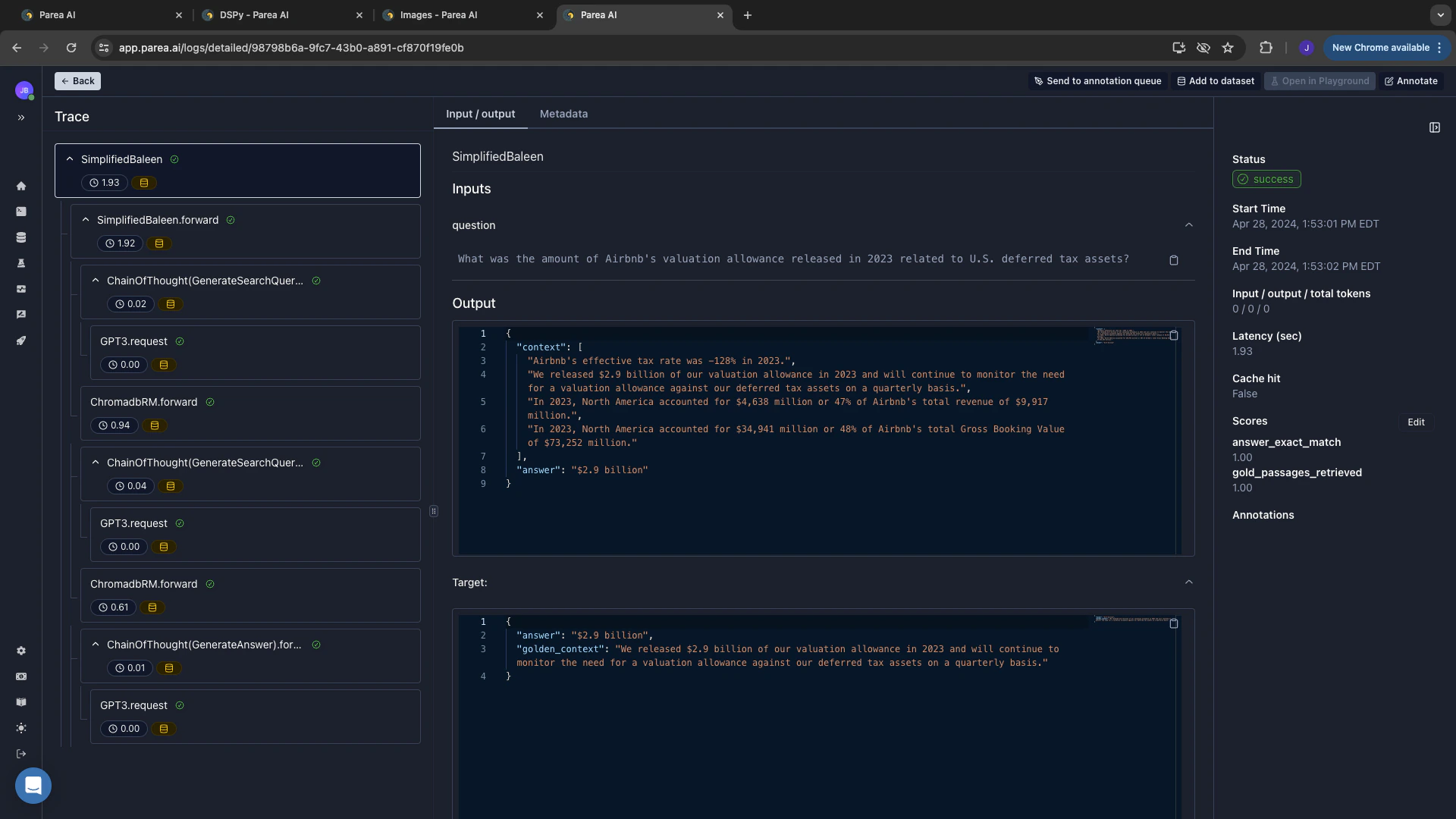
To observe your DSPy application, you can use `trace_dspy` to trace the execution of your DSPy modules.
```python theme={null}
from parea import Parea
p = Parea(api_key=os.getenv("PAREA_API_KEY"))
p.trace_dspy()
```
This will create traces like the one below:
 ### Suppress Logging During Optimization / Compilation
Note, that optimization/compilation with DSPy can create a lot of logs which aren't necessarily actionable.
You can suppress these logs by using the `TurnOffPareaLogging` context manager.
After optimization, you will likely want to assess the performance of your module as outlined [below](/integrations/dspy/dspy#experiment-optimization-tracking-evaluate-dspy-modules-on-a-dataset).
```python theme={null}
from parea.helpers import TurnOffPareaLogging
teleprompter = ...
with TurnOffPareaLogging(): # turn of logging during optimization
compiled_model = teleprompter.compile(...)
```
### Limitations
#### Threading & Multi-processing
The DSPy integration automatically creates nested traces by relying on Python's `contextvars`.
That means, if you are using threading or multi-processing in your DSPy application, the traces of the DSPy modules in that get orphaned from the main trace.
There is an [existing issue](https://github.com/python/cpython/pull/9688#issuecomment-544304996) in Python's standard library and a [great explanation](https://github.com/tiangolo/fastapi/issues/2776#issuecomment-776659392) in the FastAPI repo that discusses this limitation.
To avoid this, you need to manually copy over the context to the new thread/process via `contextvars.copy_context()`.
See the below example:
```python theme={null}
from concurrent.futures import ThreadPoolExecutor
import contextvars
import os
import dspy
from dotenv import load_dotenv
from parea import Parea
load_dotenv()
p = Parea(api_key=os.getenv("PAREA_API_KEY"))
p.trace_dspy()
gpt3_turbo = dspy.OpenAI(model="gpt-3.5-turbo-1106", max_tokens=300)
dspy.configure(lm=gpt3_turbo)
class QASignature(dspy.Signature):
question = dspy.InputField()
answer = dspy.OutputField()
class EnsembleQA(dspy.Module):
def __init__(self):
super().__init__()
self.step1 = dspy.ChainOfThought(QASignature)
self.step2 = dspy.ChainOfThought(QASignature)
def forward(self, question):
with ThreadPoolExecutor(max_workers=2) as executor:
context1 = contextvars.copy_context()
future1 = executor.submit(context1.run, self.step1, question=question)
context2 = contextvars.copy_context()
future2 = executor.submit(context2.run, self.step2, question=question + "?")
answer1 = future1.result()
answer2 = future2.result()
return dspy.Prediction(answer=f"{answer1}\n\n{answer2}")
qa = EnsembleQA()
response = qa("Who are you?")
print(response.answer)
```
## Experiment/Optimization Tracking: Evaluate DSPy Modules on a Dataset
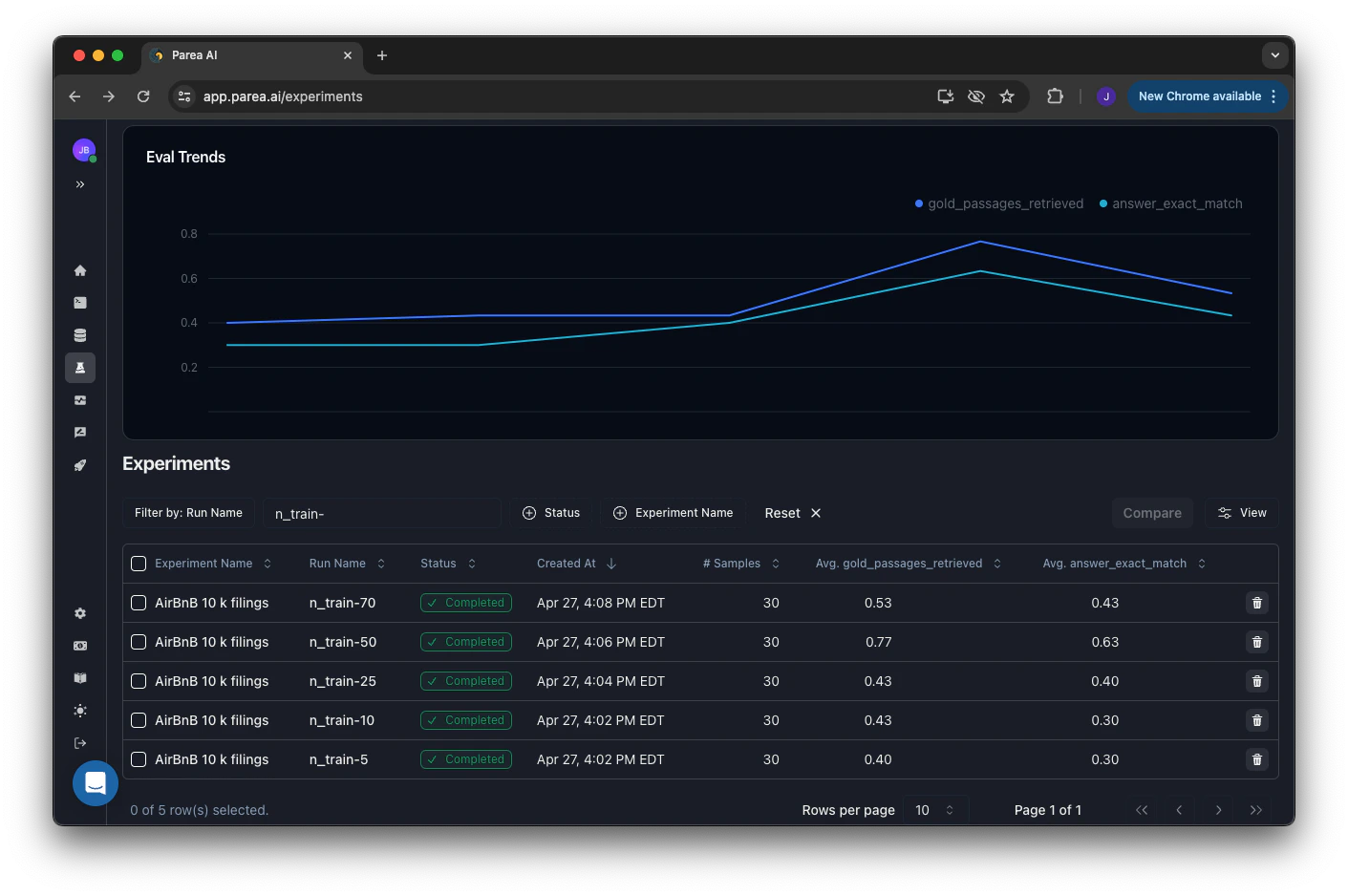
You can evaluate & track the performance of your DSPy modules by [running experiments](/welcome/getting-started-evaluation).
To evaluate DSPy modules, you need to attach the evaluation metrics to the module (`attach_evals_to_module`) and convert the DSPy examples to dictionaries (`convert_dspy_examples_to_parea_dicts`).
```python theme={null}
from parea.utils.trace_integrations.dspy import attach_evals_to_module, convert_dspy_examples_to_parea_dicts
my_dspy_module_instance = ...
eval_metrics = [ ... ]
dspy_test_set = ...
p.experiment(
"experiment_name", # name of the experiment
convert_dspy_examples_to_parea_dicts(dspy_test_set), # dataset of the experiment
attach_evals_to_module(my_dspy_module_instance, eval_metrics), # function which should be evaluated
).run()
```
### Suppress Logging During Optimization / Compilation
Note, that optimization/compilation with DSPy can create a lot of logs which aren't necessarily actionable.
You can suppress these logs by using the `TurnOffPareaLogging` context manager.
After optimization, you will likely want to assess the performance of your module as outlined [below](/integrations/dspy/dspy#experiment-optimization-tracking-evaluate-dspy-modules-on-a-dataset).
```python theme={null}
from parea.helpers import TurnOffPareaLogging
teleprompter = ...
with TurnOffPareaLogging(): # turn of logging during optimization
compiled_model = teleprompter.compile(...)
```
### Limitations
#### Threading & Multi-processing
The DSPy integration automatically creates nested traces by relying on Python's `contextvars`.
That means, if you are using threading or multi-processing in your DSPy application, the traces of the DSPy modules in that get orphaned from the main trace.
There is an [existing issue](https://github.com/python/cpython/pull/9688#issuecomment-544304996) in Python's standard library and a [great explanation](https://github.com/tiangolo/fastapi/issues/2776#issuecomment-776659392) in the FastAPI repo that discusses this limitation.
To avoid this, you need to manually copy over the context to the new thread/process via `contextvars.copy_context()`.
See the below example:
```python theme={null}
from concurrent.futures import ThreadPoolExecutor
import contextvars
import os
import dspy
from dotenv import load_dotenv
from parea import Parea
load_dotenv()
p = Parea(api_key=os.getenv("PAREA_API_KEY"))
p.trace_dspy()
gpt3_turbo = dspy.OpenAI(model="gpt-3.5-turbo-1106", max_tokens=300)
dspy.configure(lm=gpt3_turbo)
class QASignature(dspy.Signature):
question = dspy.InputField()
answer = dspy.OutputField()
class EnsembleQA(dspy.Module):
def __init__(self):
super().__init__()
self.step1 = dspy.ChainOfThought(QASignature)
self.step2 = dspy.ChainOfThought(QASignature)
def forward(self, question):
with ThreadPoolExecutor(max_workers=2) as executor:
context1 = contextvars.copy_context()
future1 = executor.submit(context1.run, self.step1, question=question)
context2 = contextvars.copy_context()
future2 = executor.submit(context2.run, self.step2, question=question + "?")
answer1 = future1.result()
answer2 = future2.result()
return dspy.Prediction(answer=f"{answer1}\n\n{answer2}")
qa = EnsembleQA()
response = qa("Who are you?")
print(response.answer)
```
## Experiment/Optimization Tracking: Evaluate DSPy Modules on a Dataset
You can evaluate & track the performance of your DSPy modules by [running experiments](/welcome/getting-started-evaluation).
To evaluate DSPy modules, you need to attach the evaluation metrics to the module (`attach_evals_to_module`) and convert the DSPy examples to dictionaries (`convert_dspy_examples_to_parea_dicts`).
```python theme={null}
from parea.utils.trace_integrations.dspy import attach_evals_to_module, convert_dspy_examples_to_parea_dicts
my_dspy_module_instance = ...
eval_metrics = [ ... ]
dspy_test_set = ...
p.experiment(
"experiment_name", # name of the experiment
convert_dspy_examples_to_parea_dicts(dspy_test_set), # dataset of the experiment
attach_evals_to_module(my_dspy_module_instance, eval_metrics), # function which should be evaluated
).run()
```
 ## Online Evaluation: Evaluate DSPy Modules during Inference
If you have evaluation functions which don't require reference/target answers, you can evaluate your DSPy modules by attaching those evals to the module via `attach_evals_to_module`.
This will automatically apply your list of evals to the module whenever you call it. See the example below for more details.
```python theme={null}
import os
import dspy
from dotenv import load_dotenv
from parea import Parea
from parea.utils.trace_integrations.dspy import attach_evals_to_module
load_dotenv()
# instrument DSPy calls with Parea
p = Parea(api_key=os.getenv("PAREA_API_KEY"))
p.trace_dspy()
# configure DSPY to use GPT-3.5-turbo
gpt3_turbo = dspy.OpenAI(model="gpt-3.5-turbo-1106", max_tokens=300)
dspy.configure(lm=gpt3_turbo)
# Define a simple signature for basic question answering
class GenerateAnswer(dspy.Signature):
"""Answer questions with short factoid answers."""
question = dspy.InputField()
answer = dspy.OutputField(desc="often between 1 and 5 words")
# a simple dspy.Module that generates answers to questions using Chain-of-Thought
class AnswerModule(dspy.Module):
def __init__(self):
super().__init__()
self.generate_answer = dspy.ChainOfThought(GenerateAnswer)
def forward(self, question):
prediction = self.generate_answer(question=question)
return dspy.Prediction(answer=prediction.answer)
# an eval function that counts the number of words in the answer
def num_words(example, pred, trace=None):
return len(pred.answer.split())
# attach the eval function to the module
generate_answer = attach_evals_to_module(AnswerModule(), [num_words])
pred = generate_answer(question="What is the color of the sky?")
print(f'answer: {pred.answer}')
```
## Next Steps
Checkout our tutorial on how to improve a DSPy RAG application with Parea AI, [here](/tutorials/dspy-rag-trace-evaluate/tutorial).
Or read more about how [experiments work](/evaluation/overview) to assess variance of LLMs by using
[multiple trials](/evaluation/overview#trials),
make [experiments reproducible](/evaluation/overview#experiment-code-management),
and more.
## Online Evaluation: Evaluate DSPy Modules during Inference
If you have evaluation functions which don't require reference/target answers, you can evaluate your DSPy modules by attaching those evals to the module via `attach_evals_to_module`.
This will automatically apply your list of evals to the module whenever you call it. See the example below for more details.
```python theme={null}
import os
import dspy
from dotenv import load_dotenv
from parea import Parea
from parea.utils.trace_integrations.dspy import attach_evals_to_module
load_dotenv()
# instrument DSPy calls with Parea
p = Parea(api_key=os.getenv("PAREA_API_KEY"))
p.trace_dspy()
# configure DSPY to use GPT-3.5-turbo
gpt3_turbo = dspy.OpenAI(model="gpt-3.5-turbo-1106", max_tokens=300)
dspy.configure(lm=gpt3_turbo)
# Define a simple signature for basic question answering
class GenerateAnswer(dspy.Signature):
"""Answer questions with short factoid answers."""
question = dspy.InputField()
answer = dspy.OutputField(desc="often between 1 and 5 words")
# a simple dspy.Module that generates answers to questions using Chain-of-Thought
class AnswerModule(dspy.Module):
def __init__(self):
super().__init__()
self.generate_answer = dspy.ChainOfThought(GenerateAnswer)
def forward(self, question):
prediction = self.generate_answer(question=question)
return dspy.Prediction(answer=prediction.answer)
# an eval function that counts the number of words in the answer
def num_words(example, pred, trace=None):
return len(pred.answer.split())
# attach the eval function to the module
generate_answer = attach_evals_to_module(AnswerModule(), [num_words])
pred = generate_answer(question="What is the color of the sky?")
print(f'answer: {pred.answer}')
```
## Next Steps
Checkout our tutorial on how to improve a DSPy RAG application with Parea AI, [here](/tutorials/dspy-rag-trace-evaluate/tutorial).
Or read more about how [experiments work](/evaluation/overview) to assess variance of LLMs by using
[multiple trials](/evaluation/overview#trials),
make [experiments reproducible](/evaluation/overview#experiment-code-management),
and more.