> ## Documentation Index
> Fetch the complete documentation index at: https://docs.parea.ai/llms.txt
> Use this file to discover all available pages before exploring further.
# Instructor
> Instrument & test `instructor` code with Parea AI
Read about Parea's integration with `instructor` on the `instructor` blog [here](https://python.useinstructor.com/blog/2024/07/17/parea-for-observing-testing--fine-tuning-of-instructor/).
Instructor makes it easy to reliably get structured data like JSON from LLMs.
Parea's `instructor` integration provides these features:
* groups any LLM calls due to retries together under a single trace
* tracks any field which failed validation with the respective error message
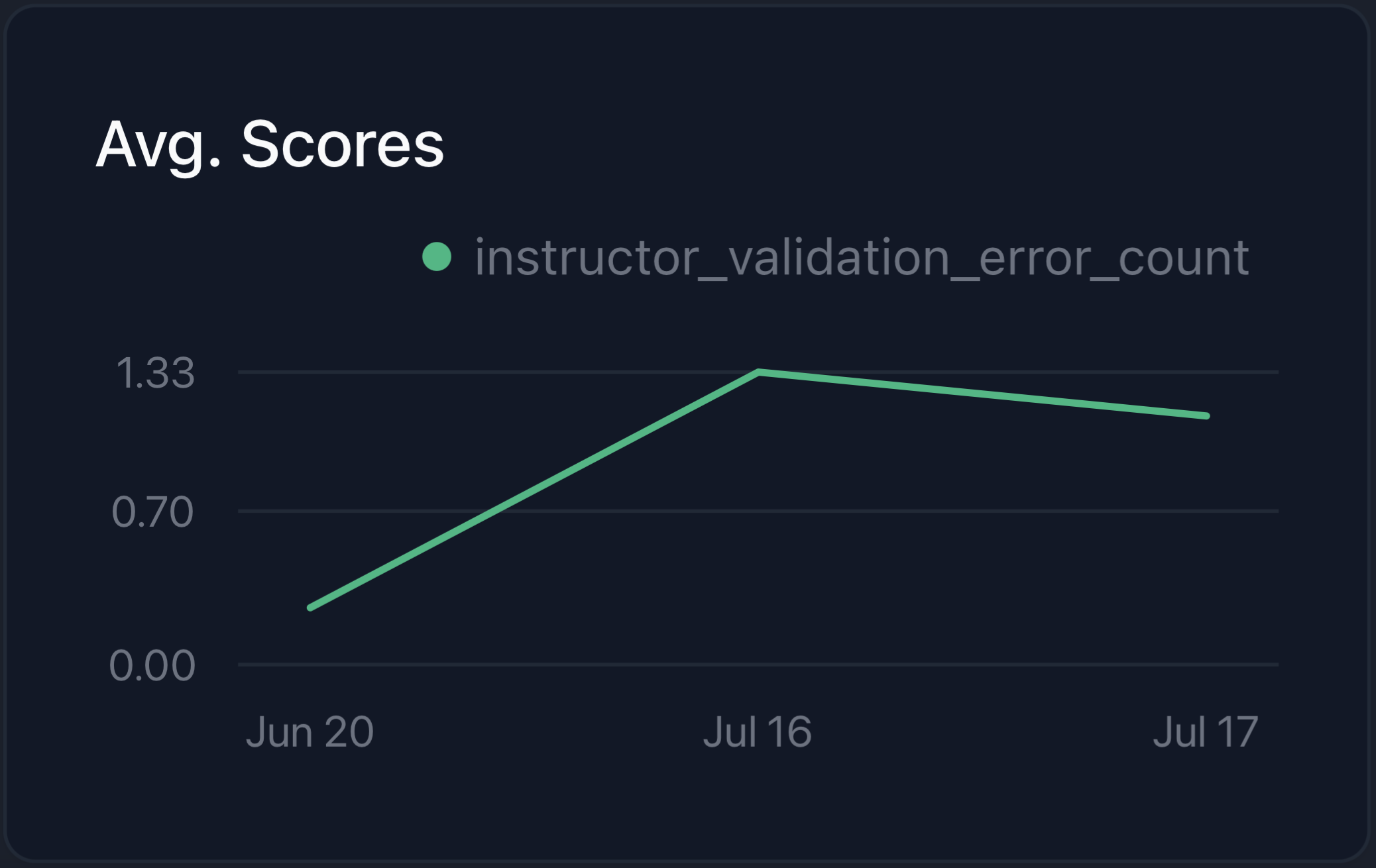
* visualizes validation error count over time
* the annotation queue provides a UI to label JSON responses by filling out a form instead of editing JSON objects
## Quickstart
```bash python theme={null}
pip install -U parea-ai instructor
```
First, create a Parea API key as shown [here](/welcome/setup).
Then, you will need to wrap the OpenAI client with Parea using `p.wrap_openai_client(client, "instructor")`.
Finally, you can use `instructor.patch` / `instructor.from_openai` to patch the OpenAI client with Instructor.
In a single code snippet:
```python Python theme={null}
from openai import AsyncOpenAI
import instructor
from parea import Parea, trace
client = AsyncOpenAI()
# Initialize Parea and wrap the OpenAI client for automatic tracing
p = Parea(api_key="PAREA_API_KEY") # <--- Replace with your Parea API key
p.wrap_openai_client(client, "instructor")
client = instructor.from_openai(client)
```
## Visualizing traces & validation errors
In your Parea logs [dashboard](https://app.parea.ai/logs), you can visualize your traces and see the detailed steps the LLM took including examining
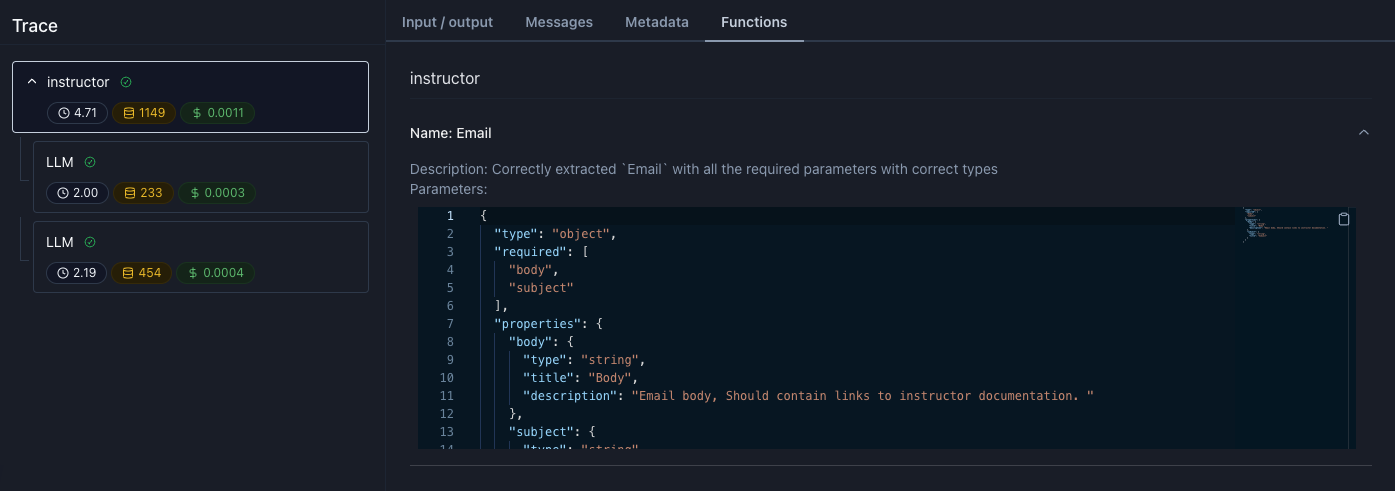
the structured output and the "functions/tools" instructor attached to the LLM call.
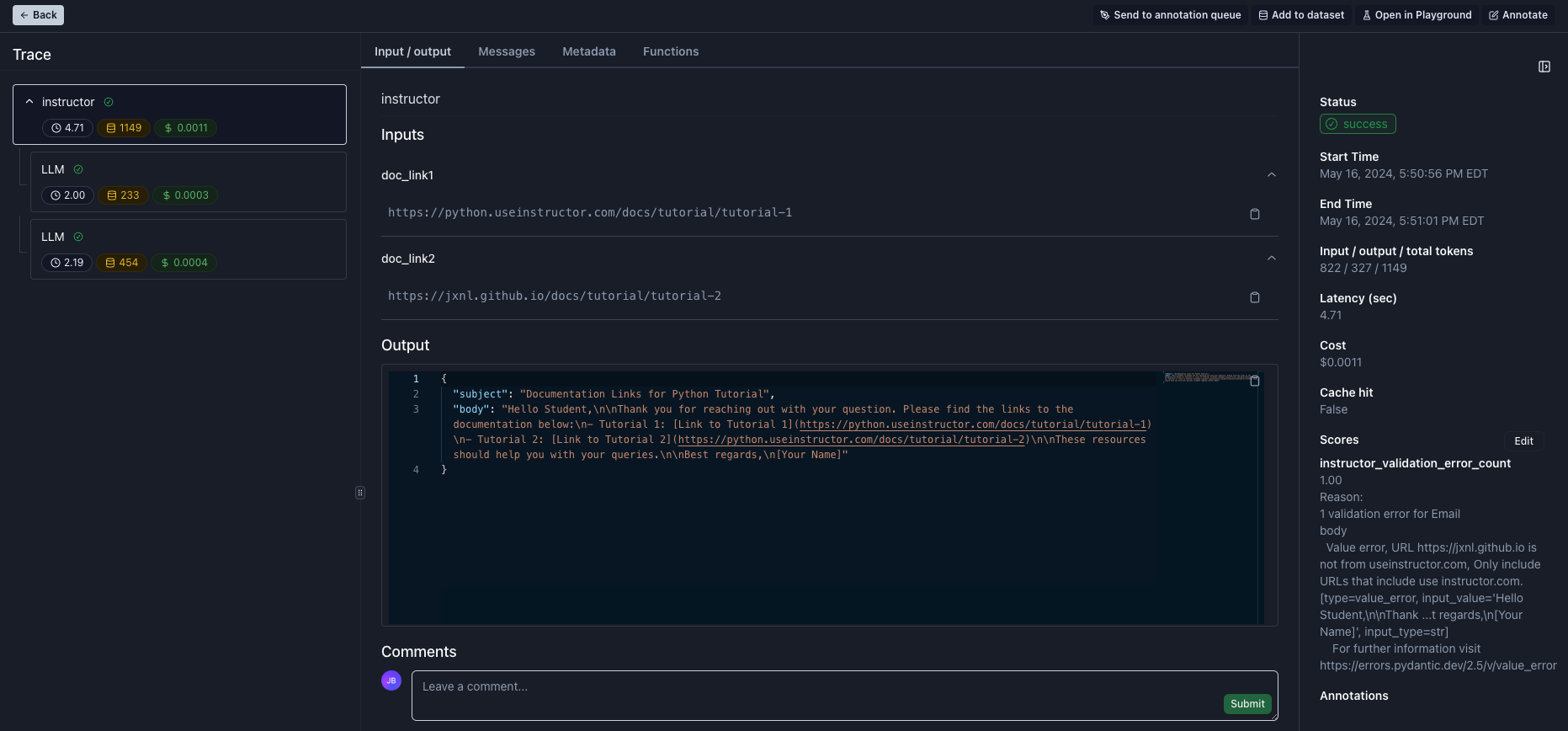
To take a look at trace of this execution checkout the screenshot below. Noticeable:
* left sidebar: all related LLM calls are grouped under a trace called `instructor`
* middle section: the root trace visualizes the `templated_inputs` as inputs and the created `Email` object as output
* bottom of right sidebar: any validation errors are captured and tracked as score for the trace which enables visualizing them in dashboards and filtering by them on tables
 Tracking & visualizing the validation error count over time.
 Here is the `Email` function schema we passed to OpenAI.
 ## Improving LLMs for Structured Output Generation
In order to improve the performance of your function call responses, you can send the requests to an [annotation queue](/manual-review/overview#annotation-queue).
In that annotation queue, non-engineers can easily label the function call responses by [filling out a form](/manual-review/overview#labeling-function-calling-tool-use-responses), and add the corrected responses to a dataset which you can use for fine-tuning.
## Fully Working Example
Below you can see a fully-working example code which uses Instructor to classify questions into different types.
```python Python theme={null}
import os
import re
import instructor
import requests
from dotenv import load_dotenv
from openai import OpenAI
from pydantic import BaseModel, Field, field_validator
from parea import Parea
load_dotenv()
client = OpenAI()
p = Parea(api_key=os.getenv("PAREA_API_KEY"))
p.wrap_openai_client(client, "instructor")
client = instructor.from_openai(client)
class Email(BaseModel):
subject: str
body: str = Field(
...,
description="Email body, Should contain links to instructor documentation. ",
)
@field_validator("body")
def check_urls(cls, v):
urls = re.findall(r"https?://(?:[-\w.]|(?:%[\da-fA-F]{2}))+", v)
errors = []
for url in urls:
if not url.startswith("https://python.useinstructor.com"):
errors.append(f"URL {url} is not from useinstructor.com, Only include URLs that include use instructor.com. ")
response = requests.get(url)
if response.status_code != 200:
errors.append(f"URL {url} returned status code {response.status_code}. Only include valid URLs that exist.")
elif "404" in response.text:
errors.append(f"URL {url} contained '404' in the body. Only include valid URLs that exist.")
if errors:
raise ValueError("\n".join(errors))
return v
def main():
email = client.messages.create(
model="gpt-3.5-turbo",
max_tokens=1024,
max_retries=3,
messages=[
{
"role": "user",
"content": "I'm responding to a student's question. Here is the link to the documentation: {{doc_link1}} and {{doc_link2}}",
}
],
template_inputs={
"doc_link1": "https://python.useinstructor.com/docs/tutorial/tutorial-1",
"doc_link2": "https://jxnl.github.io/docs/tutorial/tutorial-2",
},
response_model=Email,
)
print(email)
if __name__ == "__main__":
main()
```
## Improving LLMs for Structured Output Generation
In order to improve the performance of your function call responses, you can send the requests to an [annotation queue](/manual-review/overview#annotation-queue).
In that annotation queue, non-engineers can easily label the function call responses by [filling out a form](/manual-review/overview#labeling-function-calling-tool-use-responses), and add the corrected responses to a dataset which you can use for fine-tuning.
## Fully Working Example
Below you can see a fully-working example code which uses Instructor to classify questions into different types.
```python Python theme={null}
import os
import re
import instructor
import requests
from dotenv import load_dotenv
from openai import OpenAI
from pydantic import BaseModel, Field, field_validator
from parea import Parea
load_dotenv()
client = OpenAI()
p = Parea(api_key=os.getenv("PAREA_API_KEY"))
p.wrap_openai_client(client, "instructor")
client = instructor.from_openai(client)
class Email(BaseModel):
subject: str
body: str = Field(
...,
description="Email body, Should contain links to instructor documentation. ",
)
@field_validator("body")
def check_urls(cls, v):
urls = re.findall(r"https?://(?:[-\w.]|(?:%[\da-fA-F]{2}))+", v)
errors = []
for url in urls:
if not url.startswith("https://python.useinstructor.com"):
errors.append(f"URL {url} is not from useinstructor.com, Only include URLs that include use instructor.com. ")
response = requests.get(url)
if response.status_code != 200:
errors.append(f"URL {url} returned status code {response.status_code}. Only include valid URLs that exist.")
elif "404" in response.text:
errors.append(f"URL {url} contained '404' in the body. Only include valid URLs that exist.")
if errors:
raise ValueError("\n".join(errors))
return v
def main():
email = client.messages.create(
model="gpt-3.5-turbo",
max_tokens=1024,
max_retries=3,
messages=[
{
"role": "user",
"content": "I'm responding to a student's question. Here is the link to the documentation: {{doc_link1}} and {{doc_link2}}",
}
],
template_inputs={
"doc_link1": "https://python.useinstructor.com/docs/tutorial/tutorial-1",
"doc_link2": "https://jxnl.github.io/docs/tutorial/tutorial-2",
},
response_model=Email,
)
print(email)
if __name__ == "__main__":
main()
```