> ## Documentation Index
> Fetch the complete documentation index at: https://docs.parea.ai/llms.txt
> Use this file to discover all available pages before exploring further.
# Dataset from Trace
> Use details from a trace log to build datasets.
## Create a dataset from a trace
When viewing a trace, you can create a test case from any span that has inputs by clicking the `Add to dataset` button.
 Test cases are pre-defined datasets of inputs for prompt templates with the option to add a target (ground truth) and
tags for each case. You can use these test cases in the playground to test your prompts. [Learn more about test cases](/platform/test_hub/overview).
Test cases are pre-defined datasets of inputs for prompt templates with the option to add a target (ground truth) and
tags for each case. You can use these test cases in the playground to test your prompts. [Learn more about test cases](/platform/test_hub/overview).
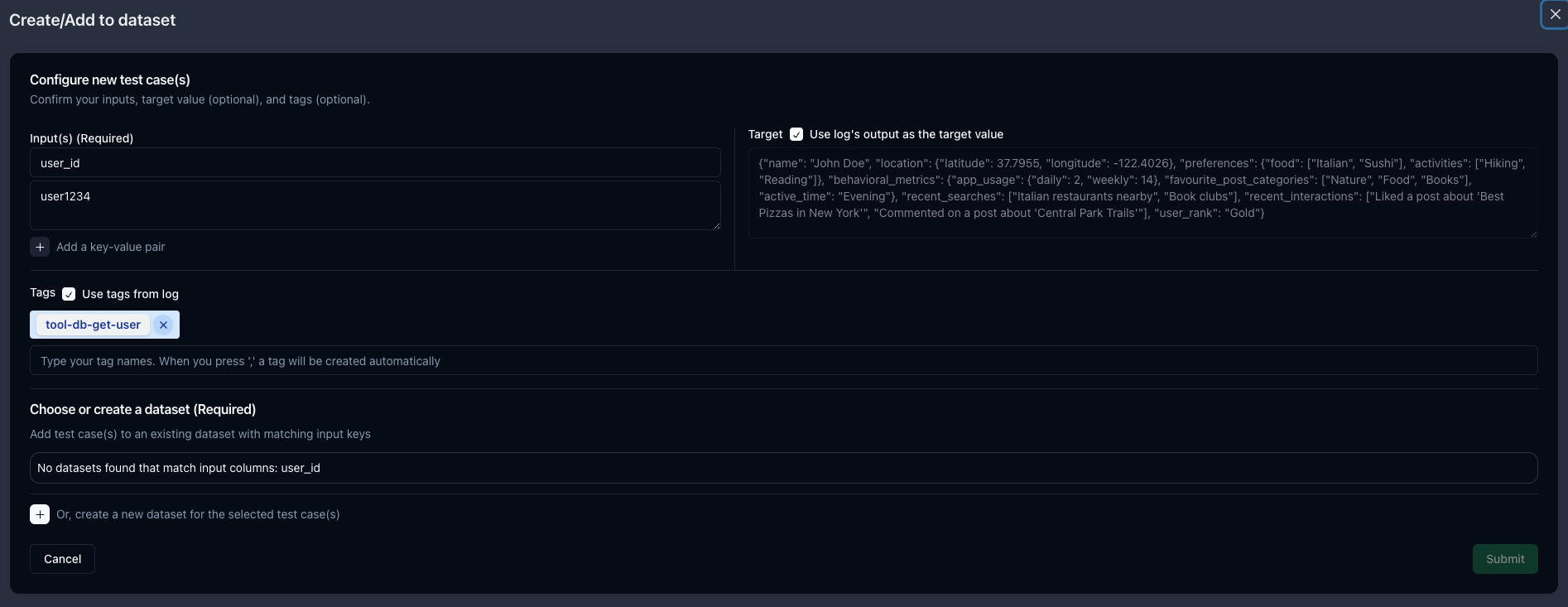 The modal will pre-populate with the data from the span.
* The trace inputs will be mapped to key-value pairs. You can edit, delete, or add your own inputs as needed.
* The output field will be pre-populated as an optional `target`. You can edit or delete this as needed.
* Any tags will also be populated. You can edit or delete these as needed.
If there are any existing datasets with the same input keys, you can add the new case to that dataset.
Otherwise, you can click the `+` button to create a new dataset.
Datasets can be viewed/edited from the [Datasets](https://app.parea.ai/datasets) page.
And, in the [Playground](https://app.parea.ai/playground), you can load test cases for prompt testing.
The modal will pre-populate with the data from the span.
* The trace inputs will be mapped to key-value pairs. You can edit, delete, or add your own inputs as needed.
* The output field will be pre-populated as an optional `target`. You can edit or delete this as needed.
* Any tags will also be populated. You can edit or delete these as needed.
If there are any existing datasets with the same input keys, you can add the new case to that dataset.
Otherwise, you can click the `+` button to create a new dataset.
Datasets can be viewed/edited from the [Datasets](https://app.parea.ai/datasets) page.
And, in the [Playground](https://app.parea.ai/playground), you can load test cases for prompt testing.