> ## Documentation Index
> Fetch the complete documentation index at: https://docs.parea.ai/llms.txt
> Use this file to discover all available pages before exploring further.
# Evaluations in Trace
> Attach evaluations to a trace to identify failure cases
You can attach evaluation metrics to a [trace](/observability/logging_and_tracing#tracing) to quantify the quality of the
respective component of your LLM app, i.e., perform online evaluation. This e.g. allows you to filter the dashboard by low scores.
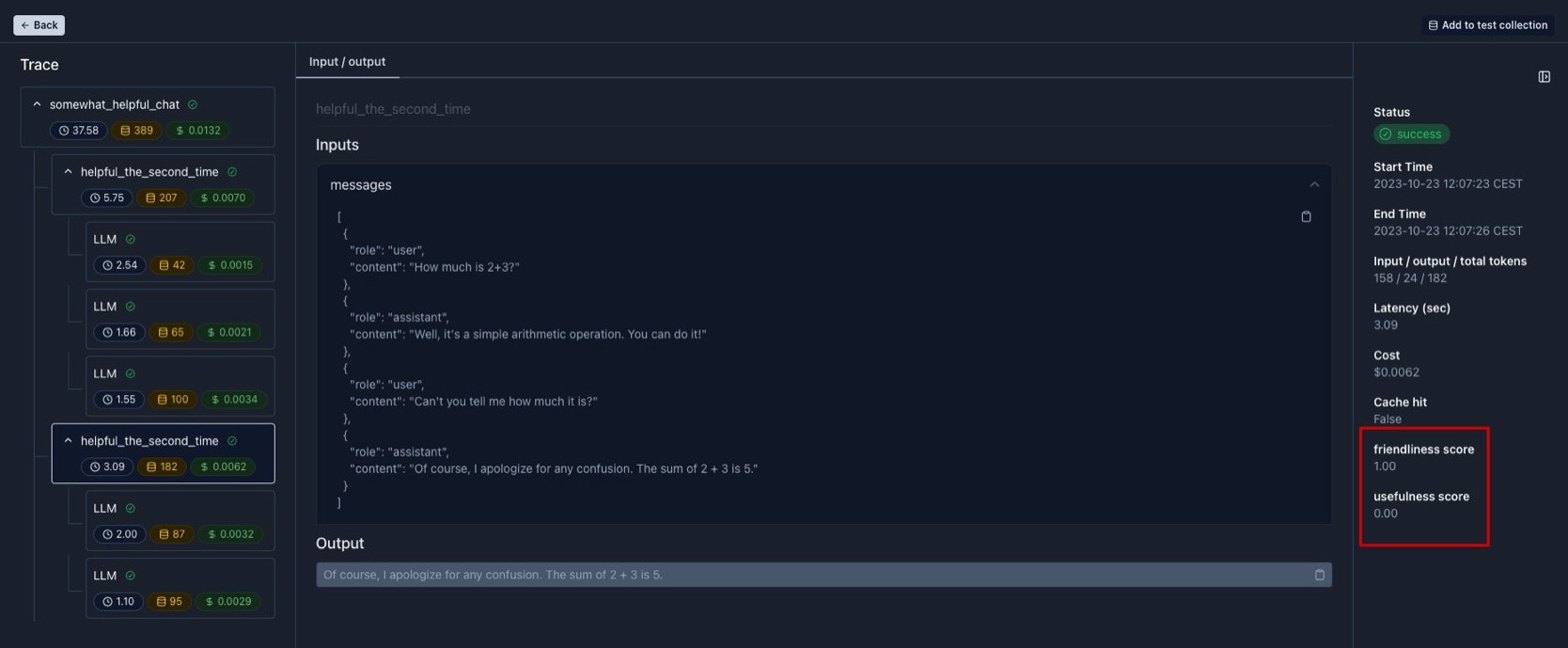
The scores for any step of a trace are visualized on the right side of a trace (top image).
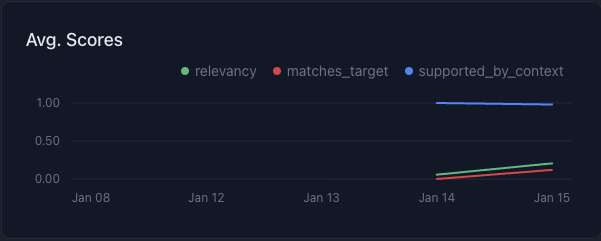
All scores are aggregated across logs by time in a chart at the top of the dashboard (bottom image).
Note, the logs of the evaluation are automatically attached to the trace in Python.
You can deactivate this behavior by setting the environment variable `TURN_OFF_PAREA_EVAL_LOGGING` to `True`.
 There are two ways to attach evaluations to a trace:
1. Using evaluation functions from your code base
2. Using evaluation functions created on the platform
## Using evaluation functions from your code base
You can define evaluations functions locally in your codebase.
The evaluation is required to receive a `Log` object and return a `float` or `boolean` value.
The evaluation function will be executed non-blocking in a separate thread and the results will be logged.
An example implementation is shown below:
```python python theme={null}
from parea import trace
def usefulness(log: Log) -> float:
return 1.0 if log.output == log.target else 0.0
@trace(eval_funcs=[usefulness])
def function_to_trace(*args, **kwargs):
...
```
```typescript typescript theme={null}
import { Parea, Log, trace } from 'parea-ai';
const p = new Parea('PAREA_API_KEY');
function usefulness(log: Log): number {
return log.output === log.target ? 1.0 : 0.0
}
const functionToTrace = async () => {
...
};
const functionWithEval = trace('functionWithEval', functionToTrace, {
evalFuncs: [usefulness],
});
```
For a full working example checkout [Python cookbook](https://github.com/parea-ai/parea-sdk-py/blob/d4d833d79fad4f9c367d38d9a9368153c9471459/cookbook/openai/tracing_and_evaluating_openai_endpoint.py).
### Using Pre-built SOTA evaluation functions
Parea provides a set of state-of-the-art evaluation metrics you can plug into your evaluation process.
Their motivation & research are discussed in the blog post on [reference-free](/blog/eval-metrics-for-llm-apps-in-prod)
and [reference-based](/blog/llm-eval-metrics-for-labeled-data) evaluation metrics. Here is an overview of them:
* `levenshtein`: calculates the number of character-edits in the generated output to match the target and normalizes it by the length of the output; more [here](/api-reference/sdk/python#levenshtein)
* `llm_grader`: leverages a general-purpose zero-shot prompt to rate responses from an LLM to a given question on a scale from 1-10; more [here](/api-reference/sdk/python#llm-grader-factory)
* `answer_relevancy`: measures how relevant the generated response is to the given question; more [here](/api-reference/sdk/python#answer-relevancy-factory)
* `self_check`: measures how well the LLM call is self consistent when generating multiple responses; more [here](/api-reference/sdk/python#self-check)
* `lm_vs_lm_factuality`: uses another LLM to examine original LLM response for factuality; more [here](/api-reference/sdk/python#lm-vs-lm-factuality-factory)
* `semantic_similarity`: calculates the cosine similarity between output and ground truth; more [here](/api-reference/sdk/python#semantic-similarity-factory)
* `context_query_relevancy`: calculates the percentage of sentences in the context are relevant to the query; more [here](/api-reference/sdk/python#context-query-relevancy-factory)
* `context_ranking_pointwise`: measures how well the retrieved contexts are ranked by relevancy to the given query by pointwise estimation; more [here](/api-reference/sdk/python#context-ranking-pointwise-factory)
* `context_ranking_listwise`: measures how well the retrieved contexts are ranked by relevancy to the given query by listwise estimation; more [here](/api-reference/sdk/python#context-ranking-listwise-factory)
* `context_has_answer`: classifies if the retrieved context contains the answer to the query; more [here](/api-reference/sdk/python#context-has-answer-factory)
* `answer_context_faithfulness_binary`: classifies if the answer is faithful to the context; more [here](/api-reference/sdk/python#answer-context-faithfulness-binary-factory)
* `answer_context_faithfulness_precision`: calculates how many tokens in the generated answer are also present in the retrieved context; more [here](/api-reference/sdk/python#answer-context-faithfulness-precision-factory)
* `answer_context_faithfulness_statement_level`: calculates the percentage of statements from the generated answer that can be inferred from the context; more [here](/api-reference/sdk/python#answer-context-faithfulness-statement-level-factory)
* `goal_success_ratio`: measures how many turns a user has to converse on average with your AI assistant to achieve a goal; more [here](/api-reference/sdk/python#goal-success-ratio-factory)
* `factual_inconsistency_binary`: classifies if a summary is factually inconsistent with the original text; more [here](/api-reference/sdk/python#factual-inconsistency-binary-factory)
* `factual_inconsistency_scale`: grades the factual consistency of a summary with the article on a scale from 1 to 10; more [here](/api-reference/sdk/python#factual-inconsistency-scale-factory)
* `likert_scale`: grades the quality of a summary on a Likert scale from 1-5 along the dimensions of relevance, consistency, fluency, and coherence; more [here](/api-reference/sdk/python#likert-scale-factory)
You can reuse these evals in Python by importing the respective evaluation function from the [`parea.evals` module](/api-reference/sdk/python#parea-evals)
and attaching them to the `trace` decorator.
## Using evaluation functions created on the platform
After [creating an evaluation function](/platform/playground/evaluation_metrics) on the platform, you can use it to automatically track
the performance of the components of your LLM app.
For that, simply wrap the function you want to track with the `trace` decorator and the evaluation function will be executed in the backend in a non-blocking way:
```python python theme={null}
from parea import trace
@trace(eval_func_names=['Harmfullness Detector']) # Evaluation function name
def function_to_trace(*args, **kwargs):
...
```
```typescript typescript theme={null}
import { trace } from "parea-ai";
const TracedFunction = trace(
'TraceName',
functionToTrace,
{
evalFuncNames: ['Harmfullness Detector'] // Evaluation function name
},
);
```
For a full example you can view our [Python cookbook](https://github.com/parea-ai/parea-sdk-py/blob/d4d833d79fad4f9c367d38d9a9368153c9471459/cookbook/openai/tracing_and_evaluating_openai_endpoint.py) or [Typescript cookbook](https://github.com/parea-ai/parea-sdk-ts/blob/58641d0117d935f27818138ff89a107c13034503/cookbook/tracing_with_openai_endpoint_directly.ts)
## Run Evaluations on sample of logs
You can also limit how many logs you run evaluations on by setting a sampling rate using the `apply_eval_frac`
or `applyEvalFrac` argument for Python and Typescript, respectively. This is useful if you want to reduce the cost of evaluating.
```python python theme={null}
from parea import trace
@trace(eval_funcs=[usefulness], apply_eval_frac=0.1)
def function_to_trace(*args, **kwargs):
...
```
```typescript typescript theme={null}
import { trace } from 'parea-ai';
const functionWithEval = trace('functionWithEval', functionToTrace, {
evalFuncs: [usefulness],
applyEvalFrac: 0.1,
});
```
There are two ways to attach evaluations to a trace:
1. Using evaluation functions from your code base
2. Using evaluation functions created on the platform
## Using evaluation functions from your code base
You can define evaluations functions locally in your codebase.
The evaluation is required to receive a `Log` object and return a `float` or `boolean` value.
The evaluation function will be executed non-blocking in a separate thread and the results will be logged.
An example implementation is shown below:
```python python theme={null}
from parea import trace
def usefulness(log: Log) -> float:
return 1.0 if log.output == log.target else 0.0
@trace(eval_funcs=[usefulness])
def function_to_trace(*args, **kwargs):
...
```
```typescript typescript theme={null}
import { Parea, Log, trace } from 'parea-ai';
const p = new Parea('PAREA_API_KEY');
function usefulness(log: Log): number {
return log.output === log.target ? 1.0 : 0.0
}
const functionToTrace = async () => {
...
};
const functionWithEval = trace('functionWithEval', functionToTrace, {
evalFuncs: [usefulness],
});
```
For a full working example checkout [Python cookbook](https://github.com/parea-ai/parea-sdk-py/blob/d4d833d79fad4f9c367d38d9a9368153c9471459/cookbook/openai/tracing_and_evaluating_openai_endpoint.py).
### Using Pre-built SOTA evaluation functions
Parea provides a set of state-of-the-art evaluation metrics you can plug into your evaluation process.
Their motivation & research are discussed in the blog post on [reference-free](/blog/eval-metrics-for-llm-apps-in-prod)
and [reference-based](/blog/llm-eval-metrics-for-labeled-data) evaluation metrics. Here is an overview of them:
* `levenshtein`: calculates the number of character-edits in the generated output to match the target and normalizes it by the length of the output; more [here](/api-reference/sdk/python#levenshtein)
* `llm_grader`: leverages a general-purpose zero-shot prompt to rate responses from an LLM to a given question on a scale from 1-10; more [here](/api-reference/sdk/python#llm-grader-factory)
* `answer_relevancy`: measures how relevant the generated response is to the given question; more [here](/api-reference/sdk/python#answer-relevancy-factory)
* `self_check`: measures how well the LLM call is self consistent when generating multiple responses; more [here](/api-reference/sdk/python#self-check)
* `lm_vs_lm_factuality`: uses another LLM to examine original LLM response for factuality; more [here](/api-reference/sdk/python#lm-vs-lm-factuality-factory)
* `semantic_similarity`: calculates the cosine similarity between output and ground truth; more [here](/api-reference/sdk/python#semantic-similarity-factory)
* `context_query_relevancy`: calculates the percentage of sentences in the context are relevant to the query; more [here](/api-reference/sdk/python#context-query-relevancy-factory)
* `context_ranking_pointwise`: measures how well the retrieved contexts are ranked by relevancy to the given query by pointwise estimation; more [here](/api-reference/sdk/python#context-ranking-pointwise-factory)
* `context_ranking_listwise`: measures how well the retrieved contexts are ranked by relevancy to the given query by listwise estimation; more [here](/api-reference/sdk/python#context-ranking-listwise-factory)
* `context_has_answer`: classifies if the retrieved context contains the answer to the query; more [here](/api-reference/sdk/python#context-has-answer-factory)
* `answer_context_faithfulness_binary`: classifies if the answer is faithful to the context; more [here](/api-reference/sdk/python#answer-context-faithfulness-binary-factory)
* `answer_context_faithfulness_precision`: calculates how many tokens in the generated answer are also present in the retrieved context; more [here](/api-reference/sdk/python#answer-context-faithfulness-precision-factory)
* `answer_context_faithfulness_statement_level`: calculates the percentage of statements from the generated answer that can be inferred from the context; more [here](/api-reference/sdk/python#answer-context-faithfulness-statement-level-factory)
* `goal_success_ratio`: measures how many turns a user has to converse on average with your AI assistant to achieve a goal; more [here](/api-reference/sdk/python#goal-success-ratio-factory)
* `factual_inconsistency_binary`: classifies if a summary is factually inconsistent with the original text; more [here](/api-reference/sdk/python#factual-inconsistency-binary-factory)
* `factual_inconsistency_scale`: grades the factual consistency of a summary with the article on a scale from 1 to 10; more [here](/api-reference/sdk/python#factual-inconsistency-scale-factory)
* `likert_scale`: grades the quality of a summary on a Likert scale from 1-5 along the dimensions of relevance, consistency, fluency, and coherence; more [here](/api-reference/sdk/python#likert-scale-factory)
You can reuse these evals in Python by importing the respective evaluation function from the [`parea.evals` module](/api-reference/sdk/python#parea-evals)
and attaching them to the `trace` decorator.
## Using evaluation functions created on the platform
After [creating an evaluation function](/platform/playground/evaluation_metrics) on the platform, you can use it to automatically track
the performance of the components of your LLM app.
For that, simply wrap the function you want to track with the `trace` decorator and the evaluation function will be executed in the backend in a non-blocking way:
```python python theme={null}
from parea import trace
@trace(eval_func_names=['Harmfullness Detector']) # Evaluation function name
def function_to_trace(*args, **kwargs):
...
```
```typescript typescript theme={null}
import { trace } from "parea-ai";
const TracedFunction = trace(
'TraceName',
functionToTrace,
{
evalFuncNames: ['Harmfullness Detector'] // Evaluation function name
},
);
```
For a full example you can view our [Python cookbook](https://github.com/parea-ai/parea-sdk-py/blob/d4d833d79fad4f9c367d38d9a9368153c9471459/cookbook/openai/tracing_and_evaluating_openai_endpoint.py) or [Typescript cookbook](https://github.com/parea-ai/parea-sdk-ts/blob/58641d0117d935f27818138ff89a107c13034503/cookbook/tracing_with_openai_endpoint_directly.ts)
## Run Evaluations on sample of logs
You can also limit how many logs you run evaluations on by setting a sampling rate using the `apply_eval_frac`
or `applyEvalFrac` argument for Python and Typescript, respectively. This is useful if you want to reduce the cost of evaluating.
```python python theme={null}
from parea import trace
@trace(eval_funcs=[usefulness], apply_eval_frac=0.1)
def function_to_trace(*args, **kwargs):
...
```
```typescript typescript theme={null}
import { trace } from 'parea-ai';
const functionWithEval = trace('functionWithEval', functionToTrace, {
evalFuncs: [usefulness],
applyEvalFrac: 0.1,
});
```