> ## Documentation Index
> Fetch the complete documentation index at: https://docs.parea.ai/llms.txt
> Use this file to discover all available pages before exploring further.
# Logging and Tracing
> Record discrete events or related events in your application from LLM requests/chains to functions.
In order to build production ready LLM applications, developers need to understand the state of their systems.
You want to track key LLM metrics, such as request inputs and outputs, as well as model specific metadata, model parameters, tokens, cost, etc.
But you also want to track your functions which may manipulate data from one LLM and chain it into another. Parea makes it easy to get this deep visibility into any LLM stack.
## Prerequisites
1. First, you'll need a Parea API key. See [Authentication](/api-reference/authentication#parea-api-key) to get started.
2. For any model you want to use with the SDK, set up your [Provider API keys](/api-reference/authentication#provider-api-keys).
3. Install the Parea SDK.
```bash python theme={null}
pip install parea-ai
```
```bash node theme={null}
npm install parea-ai
```
## Logging
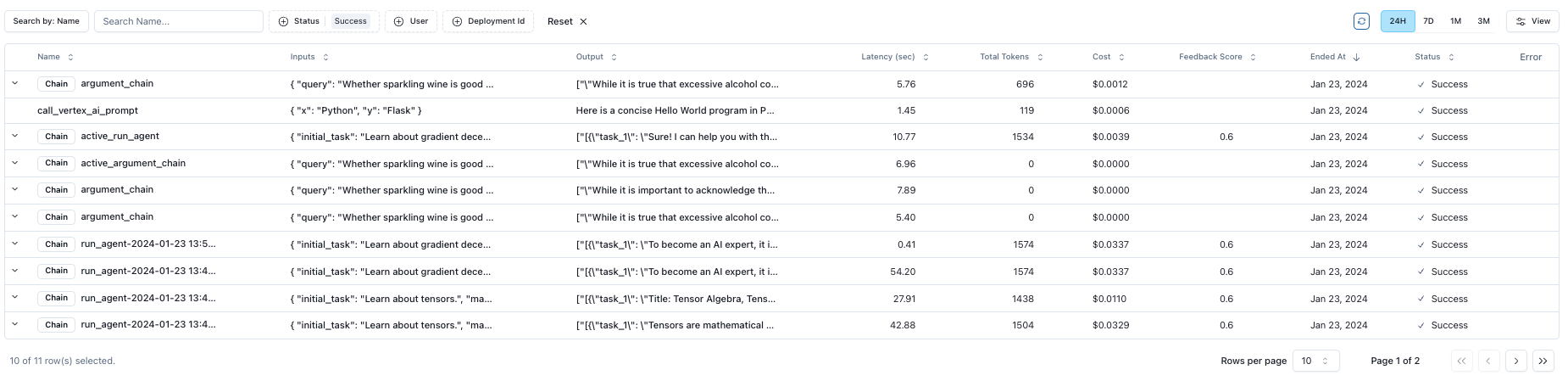
Parea automatically logs all LLM requests when using the SDK, or when using OpenAI's API.
 ### Usage
Parea supports automatic logging for OpenAI, Anthropic, Langchain, or any model if using Parea's completion method ([schema definition](/api-reference/endpoint/completion)).
#### OpenAI API
If you want to use OpenAI directly, you can still get automatic logging using Parea's `wrap_openai_client` helper.
```python openai.py theme={null}
from openai import OpenAI
from parea import Parea
client = OpenAI(api_key="OPENAI_API_KEY")
# All you need to do is add these two lines
p = Parea(api_key="PAREA_API_KEY") # replace with your API key
p.wrap_openai_client(client)
response = client.chat.completions.create(
model="gpt-3.5-turbo",
temperature=0.5,
messages=[
{
"role": "user",
"content": "Write a Hello World program in Python using FastAPI.",
}
],
)
print(response.choices[0].message.content)
# Also works with the assistants API
assistant = client.beta.assistants.create(
name="Math Tutor",
instructions=instructions,
tools=[{"type": "code_interpreter"}],
model="gpt-4-turbo-preview",
)
print(assistant)
```
### Anthropic API
If you want to use Anthropic's Claude directly, you can still get automatic logging using Parea's `wrap_anthropic_client` helper.
```python anthropic.py theme={null}
import anthropic
from parea import Parea
p = Parea(api_key="PAREA_API_KEY") # replace with your API key
client = anthropic.Anthropic()
p.wrap_anthropic_client(client)
message = client.messages.create(
model="claude-3-opus-20240229",
max_tokens=1024,
messages=[
{
"role": "user",
"content": "Write a Hello World program in Python using FastAPI.",
}
],
)
print(message.content[0].text)
```
#### Parea Completion Method
The completion method allows you to call any LLM model you have access to on Parea with the same API interface.
You have granular control over what is logged via the parameters on Parea's completion method.
* `log_omit_inputs`: bool = field(default=False) # omit the inputs to the LLM call
* `log_omit_outputs`: bool = field(default=False) # omit the outputs from the LLM call
* `log_omit`: bool = field(default=False) # do not log anything
```python parea_completion.py theme={null}
from parea import Parea
from parea.schemas import LLMInputs, Message, ModelParams, Role, Completion
p = Parea(api_key="PAREA_API_KEY") # replace with your API key
response = p.completion(
Completion(llm_configuration=LLMInputs(
model="gpt-3.5-turbo", # this can be any model enabled on Parea
model_params=ModelParams(temp=0.5),
messages=[Message(
role=Role.user,
content="Write a Hello World program in Python using FastAPI.",
)],
))
)
print(response.content)
```
#### LangChain Framework
Parea also supports frameworks such as Langchain. You can use `PareaAILangchainTracer` as a callback to automatically log all requests and responses.
```python langchain.py theme={null}
from langchain_core.output_parsers import StrOutputParser
from langchain_core.prompts import ChatPromptTemplate
from langchain_openai import ChatOpenAI
from parea import Parea
from parea.utils.trace_integrations.langchain import PareaAILangchainTracer
# All you need to do is add these two lines
p = Parea(api_key="PAREA_API_KEY") # replace with your API key
handler = PareaAILangchainTracer()
llm = ChatOpenAI(openai_api_key="OPENAI_API_KEY") # replace with your API key
prompt = ChatPromptTemplate.from_messages([("user", "{input}")])
chain = prompt | llm | StrOutputParser()
response = chain.invoke(
{"input": "Write a Hello World program in Python using FastAPI."},
config={"callbacks": [handler]}, # <- use the callback handler here
)
print(response)
```
Parea supports automatic logging for OpenAI or any model using Parea's completion method ([schema definition](/api-reference/endpoint/completion)).
Support for Anthropic's Claude is coming soon (reach out for early access).
#### OpenAI API
If you want to use OpenAI directly, you can still get automatic logging using Parea's `patchOpenAI` helper.
```typescript openai.ts theme={null}
import OpenAI from 'openai';
import {Parea, patchOpenAI} from "parea-ai";
const openai = new OpenAI();
// All you need to do is add these two lines
new Parea("PAREA_API_KEY"); // replace with your API key
patchOpenAI(openai);
async function main(): Promise {
const response = await openai.chat.completions.create({
messages: [{role: 'user', content: "Write a hello world program in Python using FastAPI."}],
model: 'gpt-3.5-turbo',
})
return response.choices[0].message.content;
}
```
#### Parea Completion Method
The completion method allows you to call any LLM model you have access to on Parea with the same API interface.
You have granular control over what is logged via the parameters on Parea's completion method.
* `log_omit_inputs`: bool = field(default=False) # omit the inputs to the LLM call
* `log_omit_outputs`: bool = field(default=False) # omit the outputs from the LLM call
* `log_omit`: bool = field(default=False) # do not log anything
```typescript parea_completion.ts theme={null}
import {Parea} from "parea-ai";
const p = new Parea("PAREA_API_KEY"); // replace with your API key
async function main(): Promise {
const response = await p.completion({
llm_configuration: {
model: 'gpt-3.5-turbo',
model_params: {temp: 0.5},
messages: [{role: 'user', content: "Write a hello world program in Python using FastAPI."}],
}
});
return response.content
}
```
If you want to use Parea to complete and log an LLM request, you can use the [completion endpoint](/api-reference/endpoint/completion) as shown below.
To only create a log (doesn't need to be a LLM request), you can use the [log endpoint](/api-reference/endpoint/log).
Note, in below example we use the same UUID for `trace_id`, `root_trace_id`, and `parent_trace_id`.
This will create a simple log without any hierarchical trace.
To find out how to associate multiple logs to create a trace, see the [Tracing](#tracing) section.
```bash Completion theme={null}
curl 'https://parea-ai-backend-us-9ac16cdbc7a7b006.onporter.run/api/parea/v1/completion' \
-H 'Content-Type: application/json' \
-H 'x-api-key: $PAREA_API_KEY' \
-d '{
"llm_configuration": {
"model": "gpt-3.5-turbo",
"model_params": {"temp": 0.5},
"messages": [
{
"role": "user",
"content": "Write a hello world program in Python using FastAPI."
}
]
}
}'
```
```bash Log theme={null}
curl --location 'https://parea-ai-backend-us-9ac16cdbc7a7b006.onporter.run/api/parea/v1/trace_log' \
--header 'Content-Type: application/json' \
--header 'x-api-key: <>' \
--data '{
"trace_id": "<>",
"root_trace_id": "<>",
"parent_trace_id": "<>",
"trace_name":"test",
"project_name":"default",
"inputs": {
"x": "Golang",
"y": "Fiber"
},
"status": "success",
"output": "Some logged output",
"start_timestamp":"2024-05-30 13:48:34",
"end_timestamp":"2024-05-30 13:48:35",
"metadata": {"purpose": "testing"}
}'
```
## Tracing
If your LLM application has complex abstractions such as chains, agents, retrieval, tool usage, or external functions that
modify or connect prompts, then you will want a trace to associate all your related logs.
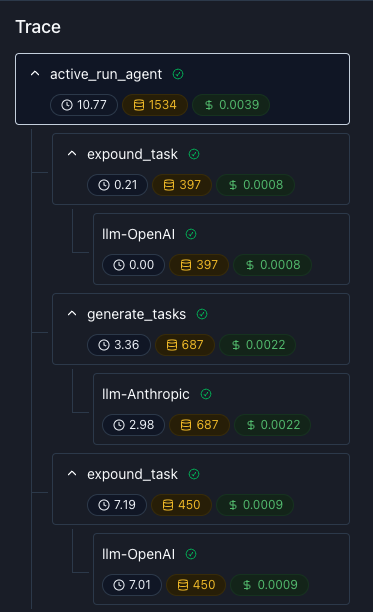
A Trace captures the entire lifecycle of a request and consists of one or more spans, representing different sub-steps.
### Usage
Parea supports automatic logging for OpenAI, Anthropic, Langchain, or any model if using Parea's completion method ([schema definition](/api-reference/endpoint/completion)).
#### OpenAI API
If you want to use OpenAI directly, you can still get automatic logging using Parea's `wrap_openai_client` helper.
```python openai.py theme={null}
from openai import OpenAI
from parea import Parea
client = OpenAI(api_key="OPENAI_API_KEY")
# All you need to do is add these two lines
p = Parea(api_key="PAREA_API_KEY") # replace with your API key
p.wrap_openai_client(client)
response = client.chat.completions.create(
model="gpt-3.5-turbo",
temperature=0.5,
messages=[
{
"role": "user",
"content": "Write a Hello World program in Python using FastAPI.",
}
],
)
print(response.choices[0].message.content)
# Also works with the assistants API
assistant = client.beta.assistants.create(
name="Math Tutor",
instructions=instructions,
tools=[{"type": "code_interpreter"}],
model="gpt-4-turbo-preview",
)
print(assistant)
```
### Anthropic API
If you want to use Anthropic's Claude directly, you can still get automatic logging using Parea's `wrap_anthropic_client` helper.
```python anthropic.py theme={null}
import anthropic
from parea import Parea
p = Parea(api_key="PAREA_API_KEY") # replace with your API key
client = anthropic.Anthropic()
p.wrap_anthropic_client(client)
message = client.messages.create(
model="claude-3-opus-20240229",
max_tokens=1024,
messages=[
{
"role": "user",
"content": "Write a Hello World program in Python using FastAPI.",
}
],
)
print(message.content[0].text)
```
#### Parea Completion Method
The completion method allows you to call any LLM model you have access to on Parea with the same API interface.
You have granular control over what is logged via the parameters on Parea's completion method.
* `log_omit_inputs`: bool = field(default=False) # omit the inputs to the LLM call
* `log_omit_outputs`: bool = field(default=False) # omit the outputs from the LLM call
* `log_omit`: bool = field(default=False) # do not log anything
```python parea_completion.py theme={null}
from parea import Parea
from parea.schemas import LLMInputs, Message, ModelParams, Role, Completion
p = Parea(api_key="PAREA_API_KEY") # replace with your API key
response = p.completion(
Completion(llm_configuration=LLMInputs(
model="gpt-3.5-turbo", # this can be any model enabled on Parea
model_params=ModelParams(temp=0.5),
messages=[Message(
role=Role.user,
content="Write a Hello World program in Python using FastAPI.",
)],
))
)
print(response.content)
```
#### LangChain Framework
Parea also supports frameworks such as Langchain. You can use `PareaAILangchainTracer` as a callback to automatically log all requests and responses.
```python langchain.py theme={null}
from langchain_core.output_parsers import StrOutputParser
from langchain_core.prompts import ChatPromptTemplate
from langchain_openai import ChatOpenAI
from parea import Parea
from parea.utils.trace_integrations.langchain import PareaAILangchainTracer
# All you need to do is add these two lines
p = Parea(api_key="PAREA_API_KEY") # replace with your API key
handler = PareaAILangchainTracer()
llm = ChatOpenAI(openai_api_key="OPENAI_API_KEY") # replace with your API key
prompt = ChatPromptTemplate.from_messages([("user", "{input}")])
chain = prompt | llm | StrOutputParser()
response = chain.invoke(
{"input": "Write a Hello World program in Python using FastAPI."},
config={"callbacks": [handler]}, # <- use the callback handler here
)
print(response)
```
Parea supports automatic logging for OpenAI or any model using Parea's completion method ([schema definition](/api-reference/endpoint/completion)).
Support for Anthropic's Claude is coming soon (reach out for early access).
#### OpenAI API
If you want to use OpenAI directly, you can still get automatic logging using Parea's `patchOpenAI` helper.
```typescript openai.ts theme={null}
import OpenAI from 'openai';
import {Parea, patchOpenAI} from "parea-ai";
const openai = new OpenAI();
// All you need to do is add these two lines
new Parea("PAREA_API_KEY"); // replace with your API key
patchOpenAI(openai);
async function main(): Promise {
const response = await openai.chat.completions.create({
messages: [{role: 'user', content: "Write a hello world program in Python using FastAPI."}],
model: 'gpt-3.5-turbo',
})
return response.choices[0].message.content;
}
```
#### Parea Completion Method
The completion method allows you to call any LLM model you have access to on Parea with the same API interface.
You have granular control over what is logged via the parameters on Parea's completion method.
* `log_omit_inputs`: bool = field(default=False) # omit the inputs to the LLM call
* `log_omit_outputs`: bool = field(default=False) # omit the outputs from the LLM call
* `log_omit`: bool = field(default=False) # do not log anything
```typescript parea_completion.ts theme={null}
import {Parea} from "parea-ai";
const p = new Parea("PAREA_API_KEY"); // replace with your API key
async function main(): Promise {
const response = await p.completion({
llm_configuration: {
model: 'gpt-3.5-turbo',
model_params: {temp: 0.5},
messages: [{role: 'user', content: "Write a hello world program in Python using FastAPI."}],
}
});
return response.content
}
```
If you want to use Parea to complete and log an LLM request, you can use the [completion endpoint](/api-reference/endpoint/completion) as shown below.
To only create a log (doesn't need to be a LLM request), you can use the [log endpoint](/api-reference/endpoint/log).
Note, in below example we use the same UUID for `trace_id`, `root_trace_id`, and `parent_trace_id`.
This will create a simple log without any hierarchical trace.
To find out how to associate multiple logs to create a trace, see the [Tracing](#tracing) section.
```bash Completion theme={null}
curl 'https://parea-ai-backend-us-9ac16cdbc7a7b006.onporter.run/api/parea/v1/completion' \
-H 'Content-Type: application/json' \
-H 'x-api-key: $PAREA_API_KEY' \
-d '{
"llm_configuration": {
"model": "gpt-3.5-turbo",
"model_params": {"temp": 0.5},
"messages": [
{
"role": "user",
"content": "Write a hello world program in Python using FastAPI."
}
]
}
}'
```
```bash Log theme={null}
curl --location 'https://parea-ai-backend-us-9ac16cdbc7a7b006.onporter.run/api/parea/v1/trace_log' \
--header 'Content-Type: application/json' \
--header 'x-api-key: <>' \
--data '{
"trace_id": "<>",
"root_trace_id": "<>",
"parent_trace_id": "<>",
"trace_name":"test",
"project_name":"default",
"inputs": {
"x": "Golang",
"y": "Fiber"
},
"status": "success",
"output": "Some logged output",
"start_timestamp":"2024-05-30 13:48:34",
"end_timestamp":"2024-05-30 13:48:35",
"metadata": {"purpose": "testing"}
}'
```
## Tracing
If your LLM application has complex abstractions such as chains, agents, retrieval, tool usage, or external functions that
modify or connect prompts, then you will want a trace to associate all your related logs.
A Trace captures the entire lifecycle of a request and consists of one or more spans, representing different sub-steps.
 ### Usage
The `@trace` decorator allows you to associate multiple processes into a single parent trace.
You only need to add the decorator to the top level function or any non-llm call function that you want to also track.
#### OpenAI API
If you want to use OpenAI directly, you can still get automatic logging using Parea's `wrap_openai_client` helper.
```python openai_trace_decorator.py theme={null}
from openai import OpenAI
from parea import Parea, trace
client = OpenAI(api_key="OPENAI_API_KEY") # replace with your API key
# All you need to do is add these two lines
p = Parea(api_key="PAREA_API_KEY") # replace with your API key
p.wrap_openai_client(client)
# We generally recommend creating a helper function to make LLM API calls.
def llm(messages: list[dict[str, str]]):
response = client.chat.completions.create(model="gpt-3.5-turbo", temperature=0.5, messages=messages)
return response.choices[0].message.content
# (Optional) You can add a trace decorator to each prompt.
# This will give the Span the name of the function.
# Without the decorator the default name for all LLM call logs is `llm-openai`
@trace
def hello_world(lang: str, framework: str):
return llm([{"role": "user", "content": f"Write a Hello World program in {lang} using {framework}."}])
@trace
def critique_code(code: str):
return llm([{"role": "user", "content": f"How can we improve this code: \n {code}"}])
# Our top level function is called chain. By adding the trace decorator here,
# all sub-functions will automatically be logged and associated with this trace.
# Notice, you can also add metadata to the trace, we'll revisit this functionality later.
@trace(metadata={"purpose": "example"}, end_user_identifier="John Doe")
def chain(lang: str, framework: str) -> str:
return critique_code(hello_world(lang, framework))
```
#### Parea Completion Method
```python trace_decorator.py theme={null}
from parea import Parea, trace
from parea.schemas import LLMInputs, Message, ModelParams, Completion
p = Parea(api_key="PAREA_API_KEY") # replace with your API key
# We generally recommend creating a helper function to make LLM API calls.
def llm(messages: list[dict[str, str]]):
return p.completion(
Completion(
llm_configuration=LLMInputs(
model="gpt-3.5-turbo",
model_params=ModelParams(temp=0.5),
messages=[Message(**m) for m in messages],
)
)
).content
# (Optional) You can add a trace decorator to each prompt.
# This will give the Span the name of the function.
# Without the decorator the default name for all LLM call logs is `LLM`
@trace
def hello_world(lang: str, framework: str):
return llm([{"role": "user", "content": f"Write a Hello World program in {lang} using {framework}."}])
@trace
def critique_code(code: str):
return llm([{"role": "user", "content": f"How can we improve this code: \n {code}"}])
# Our top level function is called chain. By adding the trace decorator here,
# all sub-functions will automatically be logged and associated with this trace.
# Notice, you can also add metadata to the trace, we'll revisit this functionality later.
@trace(metadata={"purpose": "example"}, end_user_identifier="John Doe")
def chain(lang: str, framework: str) -> str:
return critique_code(hello_world(lang, framework))
```
The `trace()` wrapper allows you to associate multiple processes into a single parent trace.
You only need to add the wrapper to the top level function or any non-llm call function that you want to also track.
#### OpenAI API
```typescript openai_trace_wrapper.ts theme={null}
import { Parea, trace } from 'parea-ai';
import OpenAI from 'openai';
import { patchOpenAI } from '../utils/wrap_openai';
import { ChatCompletionMessageParam } from 'openai/src/resources/chat/completions';
const openai = new OpenAI();
const p = new Parea('PAREA_API_KEY'); // replace with your API key
// Patch OpenAI to add trace logs
patchOpenAI(openai);
// We generally recommend creating a helper function to make LLM API calls.
async function llm(messages: ChatCompletionMessageParam[]): Promise {
const response = await openai.chat.completions.create({ model: 'gpt-3.5-turbo', messages, temperature: 0.5 });
return response.choices[0].message.content ?? '';
}
async function helloWorld(lang: string, framework: string): Promise {
return llm([{ role: 'user', content: `Write a hello world ${lang} in python using ${framework}.` }]);
}
async function critiqueCode(code: string | null): Promise {
return llm([{ role: 'user', content: `How can we improve this code: \n ${code}` }]);
}
// Our top level function is called Chain. By using the trace wrapper here,
// all sub-functions will automatically be logged and associated with this trace.
const chain = trace('Chain', async (lang: string, framework: string): Promise => {
return await critiqueCode(await helloWorld(lang, framework));
});
```
#### Parea Completion Method
```typescript trace_wrapper.ts theme={null}
import {CompletionResponse, Message, Parea, trace} from "parea-ai";
const p = new Parea("PAREA_API_KEY") // replace with your API key
// We generally recommend creating a helper function to make LLM API calls.
async function llm(messages: Message[]): Promise {
const response: CompletionResponse = await p.completion({
llm_configuration: {
model: 'gpt-3.5-turbo',
model_params: {temp: 0.5},
messages: messages,
},
});
return response.content
}
async function helloWorld(lang: string, framework: string): Promise {
return llm([{role: 'user', content: `Write a hello world ${lang} in python using ${framework}.`}])
}
async function critiqueCode(code: string | null): Promise {
return llm([{role: 'user', content: `How can we improve this code: \n ${code}`}])
}
// Our top level function is called Chain. By using the trace wrapper here,
// all sub-functions will automatically be logged and associated with this trace.
const chain = trace(
'Chain', async (lang: string, framework: string): Promise => {
return await critiqueCode(await helloWorld(lang, framework));
},
);
```
If you use the API directly, you will need to manually associate the logs to create a trace.
To do that, we rely on the following fields:
* `trace_id`: The UUID of the current trace log.
* `parent_trace_id`: The UUID of the parent of the current trace log. If the current trace log is the root, this field will be the same as `trace_id`.
* `root_trace_id`: The UUID of the root trace log. If the current trace log is the root, this field will be the same as `trace_id`.
Please, see the [API walkthrough](/tutorials/api-only/cookbook) for more information & examples on how to implement tracing.
### Limitations
#### Python: Threading & Multi-processing
The `trace` decorator relies on Python's `contextvars` to create traces.
However, when spawning threads from inside a trace the decorator will not work correctly as the `contextvars` are not correctly copied to the new threads or processes.
There is an [existing issue](https://github.com/python/cpython/pull/9688#issuecomment-544304996) in Python's standard library and a [great explanation](https://github.com/tiangolo/fastapi/issues/2776#issuecomment-776659392) in the FastAPI repo that discusses this limitation.
For example when a `@trace`-decorated function uses a `ThreadPoolExecutor` to make concurrent LLM requests the context that holds important info on the nesting hierarchy ("we are inside another trace") is not copied over correctly to the child threads.
So, the created generations will not be linked to the trace and be 'orphaned'.
In the UI, you will see a trace missing those generations.
A workaround is to manually copy over the context to the new threads or processes via `contextvars.copy_context`.
This is the recommended approach when using threading or multi-processing in Python.
```python theme={null}
from concurrent.futures import ThreadPoolExecutor
import contextvars
from parea import Parea, trace
p = Parea(api_key="PAREA_API_KEY") # replace with your Parea API key
@trace
def llm_call(question):
return f"I can't answer that question: {question}"
@trace
def multiple_llm_calls(question, n_calls: int = 2):
answers = []
with ThreadPoolExecutor(max_workers=2) as executor:
for _ in range(n_calls):
context = contextvars.copy_context()
future = executor.submit(context.run, llm_call, question)
answers.append(future.result())
return answers
response = multiple_llm_calls("Who are you?")
print(response)
```
## Disabling/sampling logging
You can either disable logging or only store a percentage of all logs in Parea.
In Python, you can disable logging by setting the environment variable `TURN_OFF_PAREA_LOGGING` to `True`.
Alternatively, you can also deactivate logging by using the `parea.helpers.TurnOffPareaLogging` context manager.
In order to reduce the amount of logs stored in Parea, you can specify the `log_sample_rate` in the `trace` decorator or `completion` function
In TypeScript, you can disable logging by setting the environment variable `PAREA_TRACE_ENABLED` to `false`.
In order to reduce the amount of logs stored in Parea, you can specify the `logSampleRate` in the `trace` decorator or `completion` function
When using the REST API directly, you can specify the `log_sample_rate` in the [record trace log](/api-reference/tracing/record-trace-log) and [completion](/api-reference/llm-proxy/completion) endpoints.
## Streaming
```python openai_stream.py theme={null}
from openai import AsyncOpenAI, OpenAI
from parea import Parea, trace
p = Parea(api_key="PAREA_API_KEY") # replace with your API key
# Sync
client = OpenAI(api_key="OPENAI_API_KEY") # replace with your API key
p.wrap_openai_client(client)
# or Async
aclient = AsyncOpenAI(api_key="OPENAI_API_KEY") # replace with your API key
p.wrap_openai_client(aclient)
simple_example = {
"model": "gpt-3.5-turbo-0125",
"messages": [
{"role": "system", "content": "You are a helpful assistant."},
{"role": "user", "content": "Hello!"}
],
"stream": True
}
@trace
def call_openai_stream(data):
stream = client.chat.completions.create(**data)
for chunk in stream:
print(chunk.choices[0].delta or "")
@trace
async def acall_openai_stream(data):
stream = await aclient.chat.completions.create(**data)
async for chunk in stream:
print(chunk.choices[0].delta or "")
```
```python parea_stream.py theme={null}
from parea import Parea
from parea.schemas import LLMInputs, ModelParams, Message, Completion
p = Parea(api_key="PAREA_API_KEY") # replace with your API key
messages = [
{"role": "system", "content": "You are a helpful assistant."},
{"role": "user", "content": "Hello!"}
]
def llm_stream(messages):
stream = p.stream(
data=Completion(
llm_configuration=LLMInputs(
model="gpt-3.5-turbo-0125", # Any model you have enabled on the Parea Platform
model_params=ModelParams(temp=0.1),
messages=[Message(**m) for m in messages],
)
)
)
for chunk in stream:
print(chunk)
async def llm_astream(messages):
stream = p.astream(
data=Completion(
llm_configuration=LLMInputs(
model="claude-1", # Any model you have enabled on the Parea Platform
model_params=ModelParams(temp=0.1),
messages=[Message(**m) for m in messages],
)
)
)
async for chunk in stream:
print(chunk)
```
## What's Next
Now that you know how to create a trace you can enrich it with [metadata](/observability/metadata) or learn how to:
* [Create a test case from a trace](/observability/dataset_from_trace)
* [Open a trace in the playground](/observability/open_trace_in_playground)
### Usage
The `@trace` decorator allows you to associate multiple processes into a single parent trace.
You only need to add the decorator to the top level function or any non-llm call function that you want to also track.
#### OpenAI API
If you want to use OpenAI directly, you can still get automatic logging using Parea's `wrap_openai_client` helper.
```python openai_trace_decorator.py theme={null}
from openai import OpenAI
from parea import Parea, trace
client = OpenAI(api_key="OPENAI_API_KEY") # replace with your API key
# All you need to do is add these two lines
p = Parea(api_key="PAREA_API_KEY") # replace with your API key
p.wrap_openai_client(client)
# We generally recommend creating a helper function to make LLM API calls.
def llm(messages: list[dict[str, str]]):
response = client.chat.completions.create(model="gpt-3.5-turbo", temperature=0.5, messages=messages)
return response.choices[0].message.content
# (Optional) You can add a trace decorator to each prompt.
# This will give the Span the name of the function.
# Without the decorator the default name for all LLM call logs is `llm-openai`
@trace
def hello_world(lang: str, framework: str):
return llm([{"role": "user", "content": f"Write a Hello World program in {lang} using {framework}."}])
@trace
def critique_code(code: str):
return llm([{"role": "user", "content": f"How can we improve this code: \n {code}"}])
# Our top level function is called chain. By adding the trace decorator here,
# all sub-functions will automatically be logged and associated with this trace.
# Notice, you can also add metadata to the trace, we'll revisit this functionality later.
@trace(metadata={"purpose": "example"}, end_user_identifier="John Doe")
def chain(lang: str, framework: str) -> str:
return critique_code(hello_world(lang, framework))
```
#### Parea Completion Method
```python trace_decorator.py theme={null}
from parea import Parea, trace
from parea.schemas import LLMInputs, Message, ModelParams, Completion
p = Parea(api_key="PAREA_API_KEY") # replace with your API key
# We generally recommend creating a helper function to make LLM API calls.
def llm(messages: list[dict[str, str]]):
return p.completion(
Completion(
llm_configuration=LLMInputs(
model="gpt-3.5-turbo",
model_params=ModelParams(temp=0.5),
messages=[Message(**m) for m in messages],
)
)
).content
# (Optional) You can add a trace decorator to each prompt.
# This will give the Span the name of the function.
# Without the decorator the default name for all LLM call logs is `LLM`
@trace
def hello_world(lang: str, framework: str):
return llm([{"role": "user", "content": f"Write a Hello World program in {lang} using {framework}."}])
@trace
def critique_code(code: str):
return llm([{"role": "user", "content": f"How can we improve this code: \n {code}"}])
# Our top level function is called chain. By adding the trace decorator here,
# all sub-functions will automatically be logged and associated with this trace.
# Notice, you can also add metadata to the trace, we'll revisit this functionality later.
@trace(metadata={"purpose": "example"}, end_user_identifier="John Doe")
def chain(lang: str, framework: str) -> str:
return critique_code(hello_world(lang, framework))
```
The `trace()` wrapper allows you to associate multiple processes into a single parent trace.
You only need to add the wrapper to the top level function or any non-llm call function that you want to also track.
#### OpenAI API
```typescript openai_trace_wrapper.ts theme={null}
import { Parea, trace } from 'parea-ai';
import OpenAI from 'openai';
import { patchOpenAI } from '../utils/wrap_openai';
import { ChatCompletionMessageParam } from 'openai/src/resources/chat/completions';
const openai = new OpenAI();
const p = new Parea('PAREA_API_KEY'); // replace with your API key
// Patch OpenAI to add trace logs
patchOpenAI(openai);
// We generally recommend creating a helper function to make LLM API calls.
async function llm(messages: ChatCompletionMessageParam[]): Promise {
const response = await openai.chat.completions.create({ model: 'gpt-3.5-turbo', messages, temperature: 0.5 });
return response.choices[0].message.content ?? '';
}
async function helloWorld(lang: string, framework: string): Promise {
return llm([{ role: 'user', content: `Write a hello world ${lang} in python using ${framework}.` }]);
}
async function critiqueCode(code: string | null): Promise {
return llm([{ role: 'user', content: `How can we improve this code: \n ${code}` }]);
}
// Our top level function is called Chain. By using the trace wrapper here,
// all sub-functions will automatically be logged and associated with this trace.
const chain = trace('Chain', async (lang: string, framework: string): Promise => {
return await critiqueCode(await helloWorld(lang, framework));
});
```
#### Parea Completion Method
```typescript trace_wrapper.ts theme={null}
import {CompletionResponse, Message, Parea, trace} from "parea-ai";
const p = new Parea("PAREA_API_KEY") // replace with your API key
// We generally recommend creating a helper function to make LLM API calls.
async function llm(messages: Message[]): Promise {
const response: CompletionResponse = await p.completion({
llm_configuration: {
model: 'gpt-3.5-turbo',
model_params: {temp: 0.5},
messages: messages,
},
});
return response.content
}
async function helloWorld(lang: string, framework: string): Promise {
return llm([{role: 'user', content: `Write a hello world ${lang} in python using ${framework}.`}])
}
async function critiqueCode(code: string | null): Promise {
return llm([{role: 'user', content: `How can we improve this code: \n ${code}`}])
}
// Our top level function is called Chain. By using the trace wrapper here,
// all sub-functions will automatically be logged and associated with this trace.
const chain = trace(
'Chain', async (lang: string, framework: string): Promise => {
return await critiqueCode(await helloWorld(lang, framework));
},
);
```
If you use the API directly, you will need to manually associate the logs to create a trace.
To do that, we rely on the following fields:
* `trace_id`: The UUID of the current trace log.
* `parent_trace_id`: The UUID of the parent of the current trace log. If the current trace log is the root, this field will be the same as `trace_id`.
* `root_trace_id`: The UUID of the root trace log. If the current trace log is the root, this field will be the same as `trace_id`.
Please, see the [API walkthrough](/tutorials/api-only/cookbook) for more information & examples on how to implement tracing.
### Limitations
#### Python: Threading & Multi-processing
The `trace` decorator relies on Python's `contextvars` to create traces.
However, when spawning threads from inside a trace the decorator will not work correctly as the `contextvars` are not correctly copied to the new threads or processes.
There is an [existing issue](https://github.com/python/cpython/pull/9688#issuecomment-544304996) in Python's standard library and a [great explanation](https://github.com/tiangolo/fastapi/issues/2776#issuecomment-776659392) in the FastAPI repo that discusses this limitation.
For example when a `@trace`-decorated function uses a `ThreadPoolExecutor` to make concurrent LLM requests the context that holds important info on the nesting hierarchy ("we are inside another trace") is not copied over correctly to the child threads.
So, the created generations will not be linked to the trace and be 'orphaned'.
In the UI, you will see a trace missing those generations.
A workaround is to manually copy over the context to the new threads or processes via `contextvars.copy_context`.
This is the recommended approach when using threading or multi-processing in Python.
```python theme={null}
from concurrent.futures import ThreadPoolExecutor
import contextvars
from parea import Parea, trace
p = Parea(api_key="PAREA_API_KEY") # replace with your Parea API key
@trace
def llm_call(question):
return f"I can't answer that question: {question}"
@trace
def multiple_llm_calls(question, n_calls: int = 2):
answers = []
with ThreadPoolExecutor(max_workers=2) as executor:
for _ in range(n_calls):
context = contextvars.copy_context()
future = executor.submit(context.run, llm_call, question)
answers.append(future.result())
return answers
response = multiple_llm_calls("Who are you?")
print(response)
```
## Disabling/sampling logging
You can either disable logging or only store a percentage of all logs in Parea.
In Python, you can disable logging by setting the environment variable `TURN_OFF_PAREA_LOGGING` to `True`.
Alternatively, you can also deactivate logging by using the `parea.helpers.TurnOffPareaLogging` context manager.
In order to reduce the amount of logs stored in Parea, you can specify the `log_sample_rate` in the `trace` decorator or `completion` function
In TypeScript, you can disable logging by setting the environment variable `PAREA_TRACE_ENABLED` to `false`.
In order to reduce the amount of logs stored in Parea, you can specify the `logSampleRate` in the `trace` decorator or `completion` function
When using the REST API directly, you can specify the `log_sample_rate` in the [record trace log](/api-reference/tracing/record-trace-log) and [completion](/api-reference/llm-proxy/completion) endpoints.
## Streaming
```python openai_stream.py theme={null}
from openai import AsyncOpenAI, OpenAI
from parea import Parea, trace
p = Parea(api_key="PAREA_API_KEY") # replace with your API key
# Sync
client = OpenAI(api_key="OPENAI_API_KEY") # replace with your API key
p.wrap_openai_client(client)
# or Async
aclient = AsyncOpenAI(api_key="OPENAI_API_KEY") # replace with your API key
p.wrap_openai_client(aclient)
simple_example = {
"model": "gpt-3.5-turbo-0125",
"messages": [
{"role": "system", "content": "You are a helpful assistant."},
{"role": "user", "content": "Hello!"}
],
"stream": True
}
@trace
def call_openai_stream(data):
stream = client.chat.completions.create(**data)
for chunk in stream:
print(chunk.choices[0].delta or "")
@trace
async def acall_openai_stream(data):
stream = await aclient.chat.completions.create(**data)
async for chunk in stream:
print(chunk.choices[0].delta or "")
```
```python parea_stream.py theme={null}
from parea import Parea
from parea.schemas import LLMInputs, ModelParams, Message, Completion
p = Parea(api_key="PAREA_API_KEY") # replace with your API key
messages = [
{"role": "system", "content": "You are a helpful assistant."},
{"role": "user", "content": "Hello!"}
]
def llm_stream(messages):
stream = p.stream(
data=Completion(
llm_configuration=LLMInputs(
model="gpt-3.5-turbo-0125", # Any model you have enabled on the Parea Platform
model_params=ModelParams(temp=0.1),
messages=[Message(**m) for m in messages],
)
)
)
for chunk in stream:
print(chunk)
async def llm_astream(messages):
stream = p.astream(
data=Completion(
llm_configuration=LLMInputs(
model="claude-1", # Any model you have enabled on the Parea Platform
model_params=ModelParams(temp=0.1),
messages=[Message(**m) for m in messages],
)
)
)
async for chunk in stream:
print(chunk)
```
## What's Next
Now that you know how to create a trace you can enrich it with [metadata](/observability/metadata) or learn how to:
* [Create a test case from a trace](/observability/dataset_from_trace)
* [Open a trace in the playground](/observability/open_trace_in_playground)