> ## Documentation Index
> Fetch the complete documentation index at: https://docs.parea.ai/llms.txt
> Use this file to discover all available pages before exploring further.
# Datasets
> Create test case datasets and benchmarks
The [Datasets tab](https://app.parea.ai/datasets) is where you can create and manage reusable data.
A dataset is a collection of test cases which consist of three things:
* `Inputs`: prompt variable values that are interpolated into the prompt template of your model config at generation time (i.e., they replace the `{{ variables }}` you define in the prompt template.
* `Target`: Represents the expected or intended output of the model.
* `Tags`: Any string metadata tags you want to attach to a test case.
## Creating Datasets
### From uploaded CSV
You can create a dataset by uploading a CSV file to the Datasets tab.
Go to [Datasets tab](https://app.parea.ai/datasets) and click `Upload file to create dataset`. In the following modal, provide a name for your
dataset and upload your file.
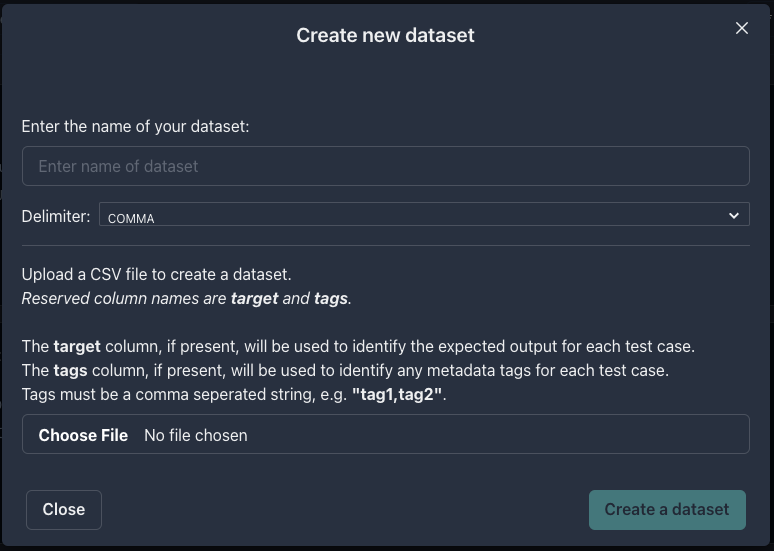 Each row from the CSV file represents a test case.
The column names represent the prompt template input variable names.
For example, if the prompt template is:
```text prompt template theme={null}
Please solve the following math question: {{ question }}
```
Then the CSV file would need a column named `question`.
Different delimiter types are supported, including comma, tab, pipe, and semicolon.
The names `target` and `tags` are reserved.
If a `target` column is present, it will be used as the gold standard answer for that row's output.
For example, in the CSV below, the target `4` is the expected answer to the question `What is 2 + 2`.
```text CSV theme={null}
question, target
What is 2 + 2, 4
```
If a `tags` column is present, it will be used as metadata tags for a specific row. Tags should be comma-separated with no spaces.
For example, in the CSV below, row one has been tagged as `easy` and `arithmetic`, and the second row `hard` and `calculus`.
```text CSV theme={null}
question, target, tags
What is 2 + 2, 4, easy, arithmetic
Evaluate ∫(1 / x^4 + 1)dx, x - 1/3(x^-3) + C, hard,calculus
```
Tags are helpful for filtering test cases in the playground.
If you have imported 10 cases in the playground and run an evaluation on all cases, then you can filter the cases
by tag and see the average score for only the selected cases.
This helps you understand whether your prompt performs well on specific test cases.
### From the SDK
Using the Python or TypeScript SDK, you can create, read and update datasets programmatically.
See the [api-reference](/api-reference/endpoint/create_dataset) for more details.
### From the playground
In the playground, after you click `Add test case`, you can optionally select `Upload new dataset` to upload a CSV file.
### From trace logs
See [Observability - Datasets](/observability/dataset_from_trace) for more details.
### From annotation queues
See [labeling in annotation queues](/manual-review/overview#labeling) for more details.
## Exporting Datasets
You can use the Python or TypeScript SDK to export datasets via the Get Dataset endpoint ([API docs](/api-reference/endpoint/get_dataset)).
### Converting to JSONL for fine-tuning
You can use helper functions in the SDK to download and then convert a dataset to JSONL format for fine-tuning.
```python python theme={null}
from parea import Parea
p = Parea(api_key=os.getenv("PAREA_API_KEY"))
dataset = p.get_collection(DATASET_ID) # Replace DATASET_ID with the actual dataset ID
dataset.write_to_finetune_jsonl("finetune.jsonl") # writes the dataset to a JSONL file
```
```typescript typescript theme={null}
import {Parea} from "parea-ai";
const p = new Parea("PAREA_API_KEY");
const dataset = await p.getCollection(DATASET_ID); // Replace DATASET_ID with the actual dataset ID
console.log(dataset.convertToFinetuneJsonl()); // returns the dataset in JSONL format (a list of dictionaries)
```
```json theme={null}
{"messages": [{"content": "Make up three people", "role": "user"}, {"role": "assistant", "function_call": {"name": "MultiUserExtract", "arguments": "{\"tasks\": [{\"name\": \"John\", \"age\": 35}, {\"name\": \"Emily\", \"age\": 27}, {\"name\": \"Charlie\", \"age\": 42}]}"}}], "functions": [{"name": "MultiUserExtract", "parameters": {"type": "object", "$defs": {"UserExtract": {"type": "object", "title": "UserExtract", "required": ["name", "age"], "properties": {"age": {"type": "integer", "title": "Age"}, "name": {"type": "string", "title": "Name"}}}}, "required": ["tasks"], "properties": {"tasks": {"type": "array", "items": {"$ref": "#/$defs/UserExtract"}, "title": "Tasks", "description": "Correctly segmented list of `UserExtract` tasks"}}}, "description": "Correct segmentation of `UserExtract` tasks"}]}
{"messages": [{"content": "Make up three people", "role": "user"}, {"role": "assistant", "function_call": {"name": "MultiUserExtract", "arguments": "{\"tasks\": [{\"name\": \"John\", \"age\": 35}, {\"name\": \"Emily\", \"age\": 27}, {\"name\": \"Charlie\", \"age\": 42}]}"}}], "functions": [{"name": "MultiUserExtract", "parameters": {"type": "object", "$defs": {"UserExtract": {"type": "object", "title": "UserExtract", "required": ["name", "age"], "properties": {"age": {"type": "integer", "title": "Age"}, "name": {"type": "string", "title": "Name"}}}}, "required": ["tasks"], "properties": {"tasks": {"type": "array", "items": {"$ref": "#/$defs/UserExtract"}, "title": "Tasks", "description": "Correctly segmented list of `UserExtract` tasks"}}}, "description": "Correct segmentation of `UserExtract` tasks"}]}
```
## Where can I use datasets?
* [Iterating on prompts in the Playground](/platform/playground/test_collection)
* [Running an experiment from the Playground](/platform/playground/trigger-experiments)
* [Running an experiment via the SDK](/evaluation/overview#use-saved-datasets)
Each row from the CSV file represents a test case.
The column names represent the prompt template input variable names.
For example, if the prompt template is:
```text prompt template theme={null}
Please solve the following math question: {{ question }}
```
Then the CSV file would need a column named `question`.
Different delimiter types are supported, including comma, tab, pipe, and semicolon.
The names `target` and `tags` are reserved.
If a `target` column is present, it will be used as the gold standard answer for that row's output.
For example, in the CSV below, the target `4` is the expected answer to the question `What is 2 + 2`.
```text CSV theme={null}
question, target
What is 2 + 2, 4
```
If a `tags` column is present, it will be used as metadata tags for a specific row. Tags should be comma-separated with no spaces.
For example, in the CSV below, row one has been tagged as `easy` and `arithmetic`, and the second row `hard` and `calculus`.
```text CSV theme={null}
question, target, tags
What is 2 + 2, 4, easy, arithmetic
Evaluate ∫(1 / x^4 + 1)dx, x - 1/3(x^-3) + C, hard,calculus
```
Tags are helpful for filtering test cases in the playground.
If you have imported 10 cases in the playground and run an evaluation on all cases, then you can filter the cases
by tag and see the average score for only the selected cases.
This helps you understand whether your prompt performs well on specific test cases.
### From the SDK
Using the Python or TypeScript SDK, you can create, read and update datasets programmatically.
See the [api-reference](/api-reference/endpoint/create_dataset) for more details.
### From the playground
In the playground, after you click `Add test case`, you can optionally select `Upload new dataset` to upload a CSV file.
### From trace logs
See [Observability - Datasets](/observability/dataset_from_trace) for more details.
### From annotation queues
See [labeling in annotation queues](/manual-review/overview#labeling) for more details.
## Exporting Datasets
You can use the Python or TypeScript SDK to export datasets via the Get Dataset endpoint ([API docs](/api-reference/endpoint/get_dataset)).
### Converting to JSONL for fine-tuning
You can use helper functions in the SDK to download and then convert a dataset to JSONL format for fine-tuning.
```python python theme={null}
from parea import Parea
p = Parea(api_key=os.getenv("PAREA_API_KEY"))
dataset = p.get_collection(DATASET_ID) # Replace DATASET_ID with the actual dataset ID
dataset.write_to_finetune_jsonl("finetune.jsonl") # writes the dataset to a JSONL file
```
```typescript typescript theme={null}
import {Parea} from "parea-ai";
const p = new Parea("PAREA_API_KEY");
const dataset = await p.getCollection(DATASET_ID); // Replace DATASET_ID with the actual dataset ID
console.log(dataset.convertToFinetuneJsonl()); // returns the dataset in JSONL format (a list of dictionaries)
```
```json theme={null}
{"messages": [{"content": "Make up three people", "role": "user"}, {"role": "assistant", "function_call": {"name": "MultiUserExtract", "arguments": "{\"tasks\": [{\"name\": \"John\", \"age\": 35}, {\"name\": \"Emily\", \"age\": 27}, {\"name\": \"Charlie\", \"age\": 42}]}"}}], "functions": [{"name": "MultiUserExtract", "parameters": {"type": "object", "$defs": {"UserExtract": {"type": "object", "title": "UserExtract", "required": ["name", "age"], "properties": {"age": {"type": "integer", "title": "Age"}, "name": {"type": "string", "title": "Name"}}}}, "required": ["tasks"], "properties": {"tasks": {"type": "array", "items": {"$ref": "#/$defs/UserExtract"}, "title": "Tasks", "description": "Correctly segmented list of `UserExtract` tasks"}}}, "description": "Correct segmentation of `UserExtract` tasks"}]}
{"messages": [{"content": "Make up three people", "role": "user"}, {"role": "assistant", "function_call": {"name": "MultiUserExtract", "arguments": "{\"tasks\": [{\"name\": \"John\", \"age\": 35}, {\"name\": \"Emily\", \"age\": 27}, {\"name\": \"Charlie\", \"age\": 42}]}"}}], "functions": [{"name": "MultiUserExtract", "parameters": {"type": "object", "$defs": {"UserExtract": {"type": "object", "title": "UserExtract", "required": ["name", "age"], "properties": {"age": {"type": "integer", "title": "Age"}, "name": {"type": "string", "title": "Name"}}}}, "required": ["tasks"], "properties": {"tasks": {"type": "array", "items": {"$ref": "#/$defs/UserExtract"}, "title": "Tasks", "description": "Correctly segmented list of `UserExtract` tasks"}}}, "description": "Correct segmentation of `UserExtract` tasks"}]}
```
## Where can I use datasets?
* [Iterating on prompts in the Playground](/platform/playground/test_collection)
* [Running an experiment from the Playground](/platform/playground/trigger-experiments)
* [Running an experiment via the SDK](/evaluation/overview#use-saved-datasets)