> ## Documentation Index
> Fetch the complete documentation index at: https://docs.parea.ai/llms.txt
> Use this file to discover all available pages before exploring further.
# A/B Testing of LLM Apps
> Leverage user feedback to run A/B tests of prompts, models & other approaches
After [offline testing](/welcome/getting-started-evaluation) changes of your LLM app, it can be beneficial to run A/B tests to further validate the updates.
In this cookbook, we will use an email generation example to demonstrate how to run A/B tests with Parea's SDK.
Running the A/B test involves three steps:
* [routing requests to different variants](#route-requests-randomly-to-the-variants)
* [capturing assocaited feedback](#capture-the-feedback)
* [analyzing the results](#analyzing-the-results)
## Sample app: email generation
In our currently existing version of an email generator we instruct the LLM to generate long emails.
With our A/B test, we will assess the effect of changing the prompt to generate short emails.
To instrument our application, we use `wrap_openai_client`/`patchOpenai` to automatically trace any LLM calls made by the OpenAI client, and `trace` to capture the inputs and outputs of the `generate_email` function.
```python Python theme={null}
from openai import OpenAI
from parea import Parea, trace
client = OpenAI()
p = Parea(api_key="<>")
# wrap OpenAI client to trace LLM calls
p.wrap_openai_client(client)
# use @trace to capture inputs, outputs of your function
# and create nested traces
@trace
def generate_email(user: str) -> str:
prompt = f"Generate a long email for {user}"
return (
client.chat.completions.create(
model="gpt-4o",
messages=[
{
"role": "user",
"content": prompt,
}
],
)
.choices[0] .message.content
)
```
```typescript TypeScript theme={null}
import { OpenAI } from 'openai';
import { Parea, patchOpenAI, trace } from 'parea-ai';
new Parea('<>');
const openai = new OpenAI({ apiKey: '<>' });
// wrap OpenAI client to trace LLM calls
patchOpenAI(openai);
// use trace to capture inputs, outputs of your function
const generate_email = trace('generate_email', async (user: string): Promise => {
const prompt = `Generate a short email for ${user}`;
const response = await openai.chat.completions.create({
model: 'gpt-4o',
messages: [
{
role: 'user',
content: prompt,
},
],
});
return response.choices[0].message.content;
});
```
## Route requests randomly to the variants
In our A/B test we will test the effect of changing the prompt to generate short emails instead of long emails.
To execute the A/B test, called `long-vs-short-emails`, we will randomly choose to generate a long email (`variant_0`, control group) or a short email (`variant_1`, treatment group).
Then, we will tag the trace with the A/B test name and the chosen variant via `trace_insert`.
Finally, we will return the email, the trace\_id, and the chosen variant.
We need to return the latter two in order to associate any feedback with the corresponding variant.
```python Python theme={null}
import random
from typing import Tuple
from parea import get_current_trace_id, trace_insert
ab_test_name = 'long-vs-short-emails'
@trace # decorator to trace functions with Parea
def generate_email(user: str) -> Tuple[str, str, str]:
# randomly choose to generate a long or short email
if random.random() < 0.5:
variant = 'variant_0'
prompt = f"Generate a long email for {user}"
else:
variant = 'variant_1'
prompt = f"Generate a short email for {user}"
# tag the requests with the A/B test name & chosen variant
trace_insert(
{
"metadata": {
"ab_test_name": ab_test_name,
f"ab_test_{ab_test_name}": variant,
}
}
)
email = (
client.chat.completions.create(
model="gpt-4o",
messages=[
{
"role": "user",
"content": prompt,
}
],
)
.choices[0] .message.content
)
# need to return in addition to the email, the trace_id and the chosen variant
return email, get_current_trace_id(), variant
```
```typescript TypeScript theme={null}
import { getCurrentTraceId, traceInsert } from 'parea-ai';
const abTestName = 'long-vs-short-emails';
// use trace to capture inputs, outputs of your function
const generateEmail = trace('generate_email', async (user: string): Promise<[string | null, string | undefined, string | null, string | undefined, string]> => {
// randomly choose to generate a long or short email
const variant = Math.random() < 0.5 ? 'variant_0' : 'variant_1';
let prompt;
if (variant === 'variant_0') {
prompt = `Generate a long email for ${user}`;
} else {
prompt = `Generate a short email for ${user}`;
}
// tag the requests with the A/B test name & chosen variant
traceInsert({
metadata: {
ab_test_name: abTestName,
[`ab_test_${abTestName}`]: variant,
},
});
const response = await openai.chat.completions.create({
model: 'gpt-4o',
messages: [
{
role: 'user',
content: prompt,
},
],
});
return [response.choices[0].message.content, getCurrentTraceId(), variant];
});
```
## Capture the feedback
Now that different requests are routed to different variants, we need to capture the associated feedback.
Such feedback could be if the email got a reply or lead to booking a meeting (e.g. in the case of sales automation) or if the user gave a thumbs up or thumbs down (e.g. in the case of an email assistant).
To do that, we will use the low-level `update_log` function of `parea_logger` to update the trace with the collected feedback as a score.
```python Python theme={null}
from parea import parea_logger, UpdateLog, EvaluationResult
def capture_feedback(feedback: float, trace_id: str, ab_test_variant: str) -> None:
parea_logger.update_log(
UpdateLog(
trace_id=trace_id,
field_name_to_value_map={
"scores": [
EvaluationResult(
name=f"ab_test_{ab_test_variant}",
score=feedback,
reason="any additional user feedback on why it's good/bad"
)
],
}
)
)
```
```typescript TypeScript theme={null}
import { pareaLogger } from "parea-ai;
const captureFeedback = async (feedback: number, traceId: string, abTestVariant: string): Promise => {
await pareaLogger.updateLog({
trace_id: traceId,
field_name_to_value_map: {
scores: [
{
name: `ab_test_${abTestVariant}`,
score: feedback,
reason: "any additional user feedback on why it's good/bad",
},
],
},
});
};
```
## Analyzing the results
Once, the A/B test is live, we can check the results in the [dashboard](https://app.parea.ai/logs) by filtering the logs for metadata key `ab_test_name` being `long-vs-short-emails`.
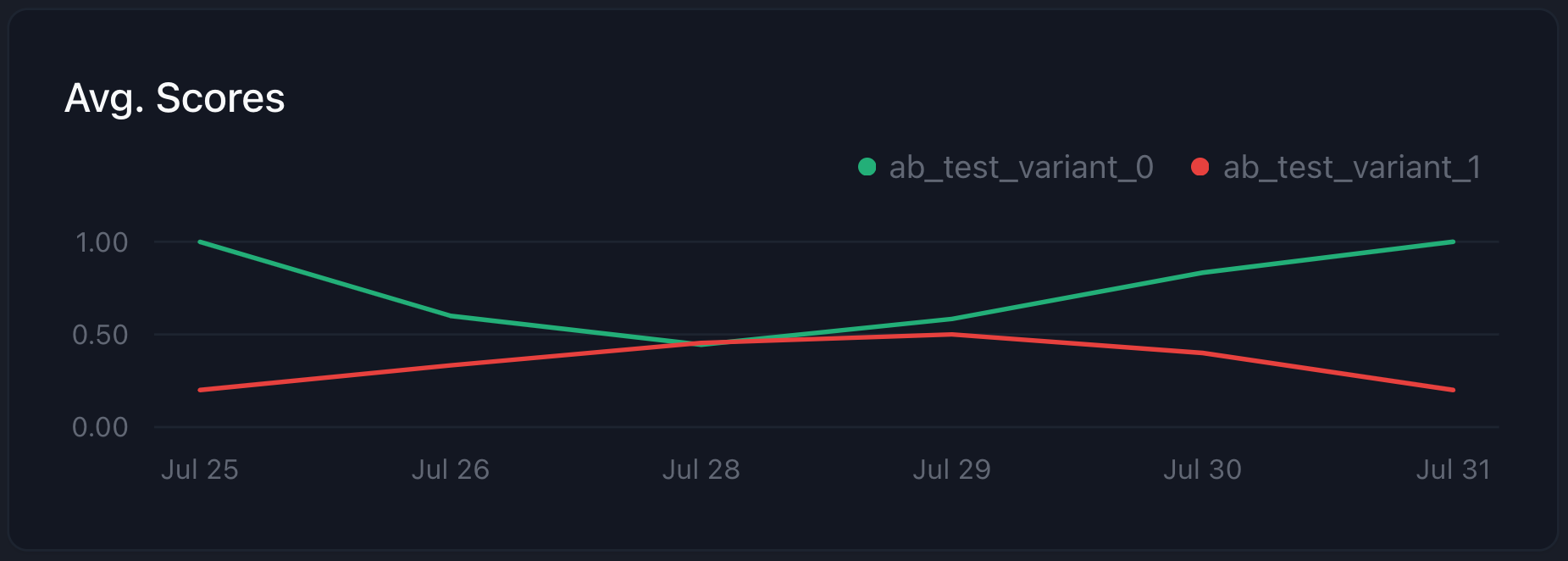 Great, we can see that `variant_1` (short emails) performs a lot better than `variant_0` (long emails)!
Checkout the full code [below](#conclusion) for why this variant is performing better.
Note, despite the clearly higher score, never forget to LOOK AT YOUR LOGS to understand what's happening!
## Bonus: capture user corrections
If your application is interactive and enables the user to correct the generated email, you should capture the correction and add it to a dataset.
This dataset of user corrected emails will be very useful for any future evals of your LLM app as well as opens the door to fine-tuning your own models.
You can capture the correction in Parea by sending it as `target` in the `update_log` function:
```python Python theme={null}
def capture_feedback(feedback: float, trace_id: str, ab_test_variant: str, user_corrected_email: str = None) -> None:
field_name_to_value_map = {
"scores": [
EvaluationResult(
name=f"ab_test_{ab_test_variant}",
score=feedback,
reason="any additional user feedback on why it's good/bad"
)
],
}
if user_corrected_email:
field_name_to_value_map["target"] = user_corrected_email
parea_logger.update_log(
UpdateLog(
trace_id=trace_id,
field_name_to_value_map=field_name_to_value_map,
)
)
```
```typescript TypeScript theme={null}
const captureFeedback = async (
feedback: number,
traceId: string,
abTestVariant: string,
userCorrectEmail: string = '',
): Promise => {
await pareaLogger.updateLog({
trace_id: traceId,
field_name_to_value_map: {
scores: [
{
name: `ab_test_${abTestVariant}`,
score: feedback,
reason: "any additional user feedback on why it's good/bad",
},
],
target: userCorrectEmail,
},
});
};
```
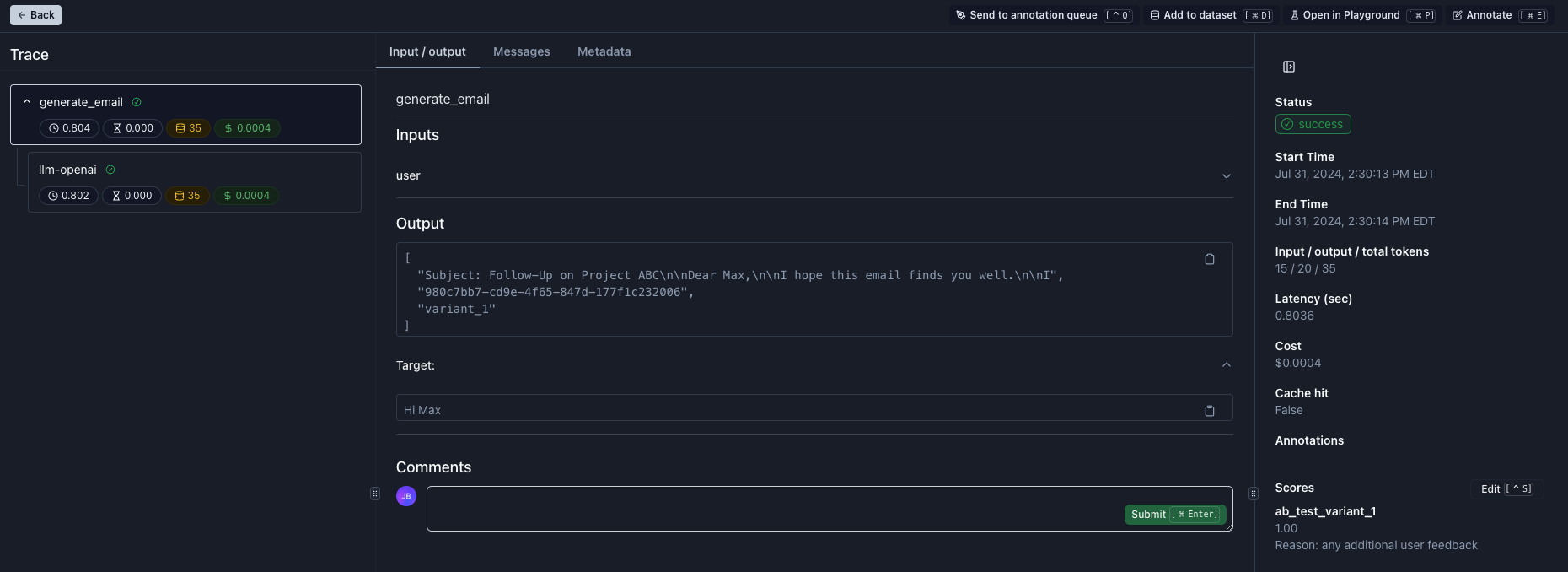
When you open the trace, you will see the user corrected email in the `target` field.
After reviewing it, you can add it to a dataset by clicking on the `Add to dataset` button or pressing `Cmd + D`.
Great, we can see that `variant_1` (short emails) performs a lot better than `variant_0` (long emails)!
Checkout the full code [below](#conclusion) for why this variant is performing better.
Note, despite the clearly higher score, never forget to LOOK AT YOUR LOGS to understand what's happening!
## Bonus: capture user corrections
If your application is interactive and enables the user to correct the generated email, you should capture the correction and add it to a dataset.
This dataset of user corrected emails will be very useful for any future evals of your LLM app as well as opens the door to fine-tuning your own models.
You can capture the correction in Parea by sending it as `target` in the `update_log` function:
```python Python theme={null}
def capture_feedback(feedback: float, trace_id: str, ab_test_variant: str, user_corrected_email: str = None) -> None:
field_name_to_value_map = {
"scores": [
EvaluationResult(
name=f"ab_test_{ab_test_variant}",
score=feedback,
reason="any additional user feedback on why it's good/bad"
)
],
}
if user_corrected_email:
field_name_to_value_map["target"] = user_corrected_email
parea_logger.update_log(
UpdateLog(
trace_id=trace_id,
field_name_to_value_map=field_name_to_value_map,
)
)
```
```typescript TypeScript theme={null}
const captureFeedback = async (
feedback: number,
traceId: string,
abTestVariant: string,
userCorrectEmail: string = '',
): Promise => {
await pareaLogger.updateLog({
trace_id: traceId,
field_name_to_value_map: {
scores: [
{
name: `ab_test_${abTestVariant}`,
score: feedback,
reason: "any additional user feedback on why it's good/bad",
},
],
target: userCorrectEmail,
},
});
};
```
When you open the trace, you will see the user corrected email in the `target` field.
After reviewing it, you can add it to a dataset by clicking on the `Add to dataset` button or pressing `Cmd + D`.
 ## Conclusion
In this cookbook, we demonstrated how to run A/B tests to optimize your LLM app based on user feedback.
To recap, you need to [route requests to the variants](#route-requests-randomly-to-the-variants) you want to test, [capture the associated feedback](#capture-the-feedback), and [analyze the results](#analyzing-the-results) in the dashboard.
If you are able to [capture corrections from your users](#bonus-capture-user-corrections), it is strongly recommended to add them to a dataset for future evaluation.
Below you can see the full working code for the A/B test.
You also can find them in our [Python](https://github.com/parea-ai/parea-sdk-py/blob/1284dd562fba2ef7bc070c5910028942f65bac40/cookbook/ab_testing.py) and [TypeScript](https://github.com/parea-ai/parea-sdk-ts/blob/9022d0d4d5a96b582812411277b2ef843c7d75c8/cookbook/ab_testing.ts) SDK cookbooks.
```python Python theme={null}
from typing import Tuple
import os
import random
from openai import OpenAI
from parea import Parea, get_current_trace_id, trace, trace_insert, parea_logger
from parea.schemas import UpdateLog, EvaluationResult
client = OpenAI()
# instantiate Parea client
p = Parea(api_key=os.getenv("PAREA_API_KEY"))
# wrap OpenAI client to trace calls
p.wrap_openai_client(client)
ab_test_name = 'long-vs-short-emails'
@trace # decorator to trace functions with Parea
def generate_email(user: str) -> Tuple[str, str, str]:
# randomly choose to generate a long or short email
if random.random() < 0.5:
variant = 'variant_0'
prompt = f"Generate a long email for {user}"
else:
variant = 'variant_1'
prompt = f"Generate a short email for {user}"
# tag the requests with the A/B test name & chosen variant
trace_insert(
{
"metadata": {
"ab_test_name": ab_test_name,
f"ab_test_{ab_test_name}": variant,
}
}
)
email = (
client.chat.completions.create(
model="gpt-4o",
messages=[
{
"role": "user",
"content": prompt,
}
],
)
.choices[0] .message.content
)
# need to return in addition to the email, the trace_id and the chosen variant
return email, get_current_trace_id(), variant
def capture_feedback(feedback: float, trace_id: str, ab_test_variant: str, user_corrected_email: str = None) -> None:
field_name_to_value_map = {
"scores": [
EvaluationResult(
name=f"ab_test_{ab_test_variant}",
score=feedback,
reason="any additional user feedback on why it's good/bad"
)
],
}
if user_corrected_email:
field_name_to_value_map["target"] = user_corrected_email
parea_logger.update_log(
UpdateLog(
trace_id=trace_id,
field_name_to_value_map=field_name_to_value_map,
)
)
def main():
# generate email and get trace ID
email, trace_id, ab_test_variant = generate_email("Max Mustermann")
# create a biased feedback for shorter emals
if ab_test_variant == 'variant_1':
user_feedback = 0.0 if random.random() < 0.7 else 1.0
else:
user_feedback = 0.0 if random.random() < 0.3 else 1.0
capture_feedback(user_feedback, trace_id, ab_test_variant, "Hi Max")
if __name__ == "__main__":
main()
```
```typescript TypeScript theme={null}
import * as dotenv from 'dotenv';
import { OpenAI } from 'openai';
import { Parea, patchOpenAI, trace, getCurrentTraceId, traceInsert, pareaLogger } from 'parea-ai';
dotenv.config();
new Parea(process.env.PAREA_API_KEY);
const openai = new OpenAI({ apiKey: process.env.OPENAI_API_KEY });
// wrap OpenAI client to trace LLM calls
patchOpenAI(openai);
const abTestName = 'long-vs-short-emails';
// use trace to capture inputs, outputs of your function
const generateEmail = trace(
'generate_email',
async (user: string): Promise<[string | null, string | undefined, string]> => {
// randomly choose to generate a long or short email
const variant = Math.random() < 0.5 ? 'variant_0' : 'variant_1';
let prompt;
if (variant === 'variant_0') {
prompt = `Generate a long email for ${user}`;
} else {
prompt = `Generate a short email for ${user}`;
}
// tag the requests with the A/B test name & chosen variant
traceInsert({
metadata: {
ab_test_name: abTestName,
[`ab_test_${abTestName}`]: variant,
},
});
const response = await openai.chat.completions.create({
model: 'gpt-4o',
messages: [
{
role: 'user',
content: prompt,
},
],
});
return [response.choices[0].message.content, getCurrentTraceId(), variant];
},
);
const captureFeedback = async (
feedback: number,
traceId: string,
abTestVariant: string,
userCorrectEmail: string = '',
): Promise => {
await pareaLogger.updateLog({
trace_id: traceId,
field_name_to_value_map: {
scores: [
{
name: `ab_test_${abTestVariant}`,
score: feedback,
reason: "any additional user feedback on why it's good/bad",
},
],
target: userCorrectEmail,
},
});
};
const main = async () => {
const [email, traceId, abTestVariant] = await generateEmail('Max Mustermann');
console.log('email:', email);
const userFeedback =
abTestVariant === 'variant_1' ? (Math.random() < 0.7 ? 0.0 : 1.0) : Math.random() < 0.3 ? 0.0 : 1.0;
await captureFeedback(userFeedback, traceId || '', abTestVariant, 'Hi Max');
};
main().then(() => console.log('Done!'));
```
## Conclusion
In this cookbook, we demonstrated how to run A/B tests to optimize your LLM app based on user feedback.
To recap, you need to [route requests to the variants](#route-requests-randomly-to-the-variants) you want to test, [capture the associated feedback](#capture-the-feedback), and [analyze the results](#analyzing-the-results) in the dashboard.
If you are able to [capture corrections from your users](#bonus-capture-user-corrections), it is strongly recommended to add them to a dataset for future evaluation.
Below you can see the full working code for the A/B test.
You also can find them in our [Python](https://github.com/parea-ai/parea-sdk-py/blob/1284dd562fba2ef7bc070c5910028942f65bac40/cookbook/ab_testing.py) and [TypeScript](https://github.com/parea-ai/parea-sdk-ts/blob/9022d0d4d5a96b582812411277b2ef843c7d75c8/cookbook/ab_testing.ts) SDK cookbooks.
```python Python theme={null}
from typing import Tuple
import os
import random
from openai import OpenAI
from parea import Parea, get_current_trace_id, trace, trace_insert, parea_logger
from parea.schemas import UpdateLog, EvaluationResult
client = OpenAI()
# instantiate Parea client
p = Parea(api_key=os.getenv("PAREA_API_KEY"))
# wrap OpenAI client to trace calls
p.wrap_openai_client(client)
ab_test_name = 'long-vs-short-emails'
@trace # decorator to trace functions with Parea
def generate_email(user: str) -> Tuple[str, str, str]:
# randomly choose to generate a long or short email
if random.random() < 0.5:
variant = 'variant_0'
prompt = f"Generate a long email for {user}"
else:
variant = 'variant_1'
prompt = f"Generate a short email for {user}"
# tag the requests with the A/B test name & chosen variant
trace_insert(
{
"metadata": {
"ab_test_name": ab_test_name,
f"ab_test_{ab_test_name}": variant,
}
}
)
email = (
client.chat.completions.create(
model="gpt-4o",
messages=[
{
"role": "user",
"content": prompt,
}
],
)
.choices[0] .message.content
)
# need to return in addition to the email, the trace_id and the chosen variant
return email, get_current_trace_id(), variant
def capture_feedback(feedback: float, trace_id: str, ab_test_variant: str, user_corrected_email: str = None) -> None:
field_name_to_value_map = {
"scores": [
EvaluationResult(
name=f"ab_test_{ab_test_variant}",
score=feedback,
reason="any additional user feedback on why it's good/bad"
)
],
}
if user_corrected_email:
field_name_to_value_map["target"] = user_corrected_email
parea_logger.update_log(
UpdateLog(
trace_id=trace_id,
field_name_to_value_map=field_name_to_value_map,
)
)
def main():
# generate email and get trace ID
email, trace_id, ab_test_variant = generate_email("Max Mustermann")
# create a biased feedback for shorter emals
if ab_test_variant == 'variant_1':
user_feedback = 0.0 if random.random() < 0.7 else 1.0
else:
user_feedback = 0.0 if random.random() < 0.3 else 1.0
capture_feedback(user_feedback, trace_id, ab_test_variant, "Hi Max")
if __name__ == "__main__":
main()
```
```typescript TypeScript theme={null}
import * as dotenv from 'dotenv';
import { OpenAI } from 'openai';
import { Parea, patchOpenAI, trace, getCurrentTraceId, traceInsert, pareaLogger } from 'parea-ai';
dotenv.config();
new Parea(process.env.PAREA_API_KEY);
const openai = new OpenAI({ apiKey: process.env.OPENAI_API_KEY });
// wrap OpenAI client to trace LLM calls
patchOpenAI(openai);
const abTestName = 'long-vs-short-emails';
// use trace to capture inputs, outputs of your function
const generateEmail = trace(
'generate_email',
async (user: string): Promise<[string | null, string | undefined, string]> => {
// randomly choose to generate a long or short email
const variant = Math.random() < 0.5 ? 'variant_0' : 'variant_1';
let prompt;
if (variant === 'variant_0') {
prompt = `Generate a long email for ${user}`;
} else {
prompt = `Generate a short email for ${user}`;
}
// tag the requests with the A/B test name & chosen variant
traceInsert({
metadata: {
ab_test_name: abTestName,
[`ab_test_${abTestName}`]: variant,
},
});
const response = await openai.chat.completions.create({
model: 'gpt-4o',
messages: [
{
role: 'user',
content: prompt,
},
],
});
return [response.choices[0].message.content, getCurrentTraceId(), variant];
},
);
const captureFeedback = async (
feedback: number,
traceId: string,
abTestVariant: string,
userCorrectEmail: string = '',
): Promise => {
await pareaLogger.updateLog({
trace_id: traceId,
field_name_to_value_map: {
scores: [
{
name: `ab_test_${abTestVariant}`,
score: feedback,
reason: "any additional user feedback on why it's good/bad",
},
],
target: userCorrectEmail,
},
});
};
const main = async () => {
const [email, traceId, abTestVariant] = await generateEmail('Max Mustermann');
console.log('email:', email);
const userFeedback =
abTestVariant === 'variant_1' ? (Math.random() < 0.7 ? 0.0 : 1.0) : Math.random() < 0.3 ? 0.0 : 1.0;
await captureFeedback(userFeedback, traceId || '', abTestVariant, 'Hi Max');
};
main().then(() => console.log('Done!'));
```